

Growth strategies for owner dentists
Grow the practice
without signing for a yearGrow without signing for a year
FlossBooked runs the dental practice growth strategy for US owner dentists: our team builds your website, places your Google and Meta ads, and sets up texting, phones and booking at the front desk, for one monthly price.
- You own every ad account we run
- One bill each month
- New patients traced to source


Live in 14 daysMonth to month, no setup fee
- Stop any month with one email
- Booking open 24/7
- Texts for unanswered calls
- Review requests
- Patient texting
- AI receptionist
Marketing contracts
Signed for a year, still guessing what works
Your web agency bills for the site and SEO. A second company charges to manage the ads, and Google bills the clicks. Twenty new patients came in last month, and most intake forms say “none” on the referral line. The deal sold as month to month renewed for a year. With FlossBooked, the site, the ads and the software come on one plan, billed monthly with no contract. Your monthly report lists each new patient beside the search, ad or page that sent them.

- Annual contracts
- Three bills
- Agency-owned ad accounts
- One bill
- Your ad accounts
- Monthly report
On every plan
What changes in your first month
Each tab shows one thing that changes, and the screen your desk or your dentists use for it. Every plan carries the whole thing, starting at $97 a month.
FlossBooked · Schedule

yourdentaloffice.com/book

New patients book after hours
A parent searching Maps at 10:15 p.m. taps Book online and picks a new patient exam, held to the length and dentist you chose.
See online schedulingFlossBooked · Calls

FlossBooked app · Inbox

The caller on line two hears back
Line two rings out mid-checkout. Seconds later the caller's phone buzzes with your booking link, texted from the practice's main number.
See business phonesFlossBooked · Reviews

FlossBooked app · Reviews

More Google reviews
Checkout done, the patient's phone lights up with your Google page, ready for a rating. Whatever they post, our people reply in the practice's voice.
See reviewsFlossBooked · Notes

FlossBooked app · Notes

Notes
AI Clinical Notes turns the appointment conversation into a draft clinical note. The dentist checks it, edits a line or two and signs before seating the next patient.
See clinical notesFlossBooked · Membership plans

yourdentaloffice.com/membership

Patients without insurance
Patients without insurance join your in-house membership plan online, pay by card monthly or yearly, and keep coming in for cleanings.
FlossBooked · Reports

FlossBooked app · Reports

Sources
A monthly report matches each new patient to the search, ad or page they came through, beside ad spend.
See reportingFlossBooked · Recall

FlossBooked app · Recall

Recall
Patients overdue for a cleaning get a text on their due date, then a nudge.
See patient textingYour practice, on the staff app
On iPhone or Android, owners check these three staff app screens between patients.
Front desk, live· On the owner's phone
Calls· By source
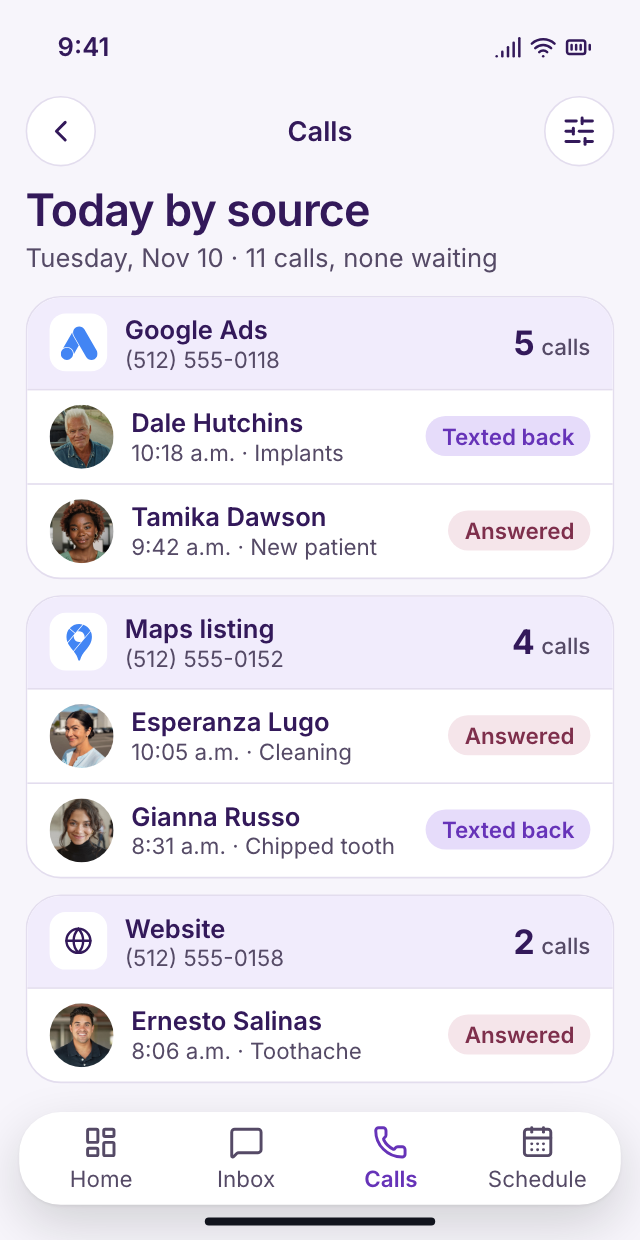
Which ad rang
Each source dials in on a different tracking number: the Google ad, the Maps listing, the website. Between patients, the calls screen shows today's calls by source, answered or texted back.
Inbox· Texts and messages
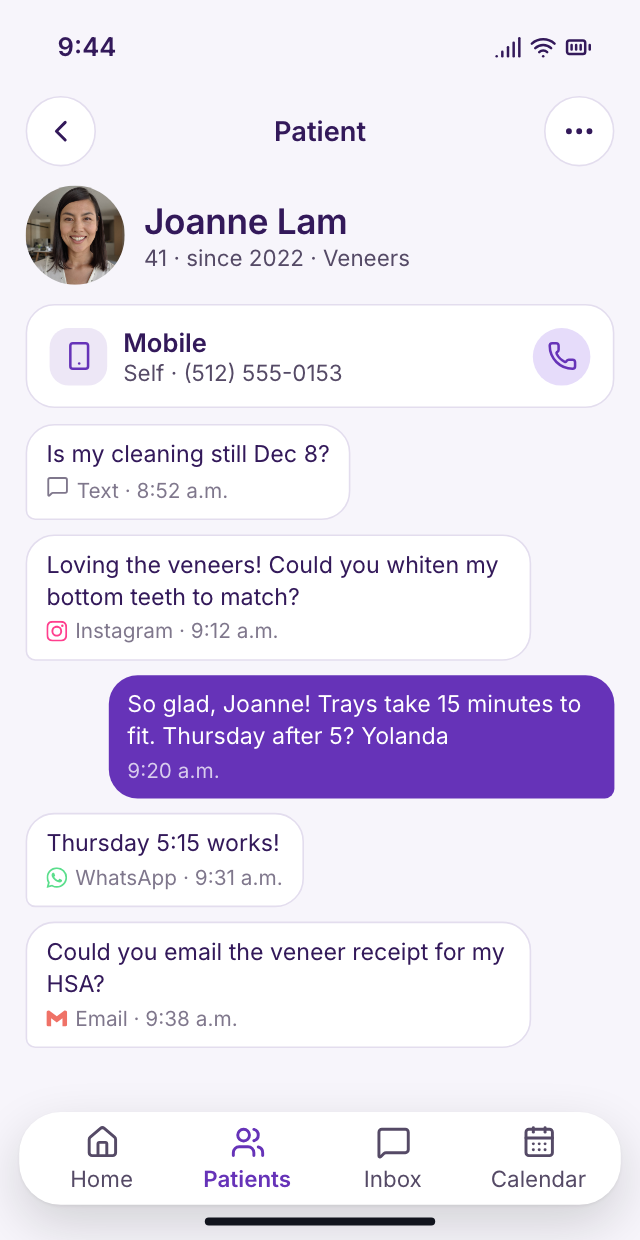
Every patient message, threaded
A text, an Instagram DM, a WhatsApp message or an email: each threads under the patient's name. Reply from the office line anywhere.
Reviews· Answered daily
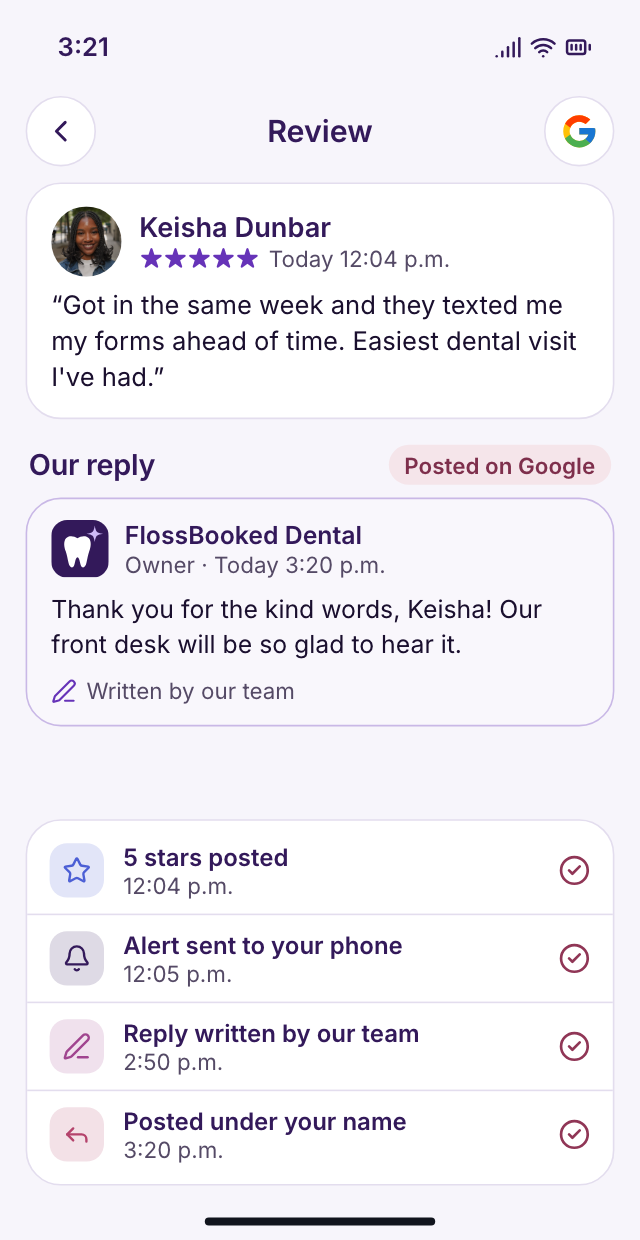
Reviews answered same-day
A Google review posts at noon. Our team replies that day under your practice name, leaving out treatment and whether the writer was ever seen.


Setup
Setup is our job, not yours
You approve the site and answer our questions. Every other line below is work we take on.
We review spending
On the demo call we total your current spend on site, SEO, ads and texting, and ask where new patients say they found you.
Bring your marketing and phone bills
Our team builds
We write the service and city pages, update your Google profile and plan the first campaigns with your budget.
Pages, Maps profile and ads drafted
Your patients and forms move
We connect your practice software, import your patient list and rebuild your paper forms online. Your office number ports over, so patients call the same line. Your front desk gets a training session on the inbox, calendar and phones.
Patient list, forms and number moved
The site and ads go live
From then on, a written summary lands monthly, plus a call where you choose next month's ad focus.
Then a report and a call monthly
Month to month, no setup fee
Setup checklist
Live in 14 days
4 of 28 done
1We review spendingDoneIn progressUp next
- Demo call: your current marketing bills, line by line
- Ad budget: agreed with you before anything runs
2Our team buildsDoneIn progressUp next
- Google profile: cleaned up so searchers can book from it
- Website pages: one per service, plus the towns you draw from
- Smile gallery: your cases, with authorization
- Google Ads: search campaigns for the treatments you want more of
- Social ads: Facebook and Instagram, aimed at families close by
- Call tracking: each campaign gets its own number
- Online booking: rules set for each visit
- Phone tree: press 1 to book, ring groups
3Your patients and forms moveDoneIn progressUp next
- Practice software: connected both ways during setup
- Patient records: names, numbers and last visit dates brought in
- Office number: ported to our phones
- Paper forms: rebuilt online, signed by text
- Consent forms: sent by visit type before the appointment
- Membership plans: online enrollment under your name, paid monthly or yearly
- Mobile app: installed for the team on iPhone and Android
- Desk training: your front desk learns the inbox, calendar and phones before launch
4The site and ads go liveDoneIn progressUp next
- Missed calls: answered by text within the minute, booking page attached
- Recall texts: on each patient's due date, then nudges
- Review texts: go out as the patient leaves, and we respond on Google for you
- Treatment plans: sent with price and financing link
- Payment links: card payments by text
- AI receptionist: covers line two, the lunch hour and evenings, then briefs your desk
- Clinical notes: drafted from each appointment
- Monthly report: which ad, search or referral sent each new patient
- Strategy call: every month
- Launch: everything switched on by day 14
Stay for the patients, not the contract
There's no contract: each month is billed on its own, and stopping takes one email before the next bill. Your ad accounts keep your practice's name whether you stay or go.


Why owners stayed

Dr. Nathan P.Owner dentist, Cedar Hill No contractstayed a yearI left an agency that wanted a year. I can stop here any month; the reports keep me.

Lucia M.Front desk lead, Brightwater Lunch callsbooked by textNew patients used to hang up when we were at lunch. Now the missed ones get a text, and I book them when I'm back.

Dr. Andre K.Associate dentist, Elmwood Notes draftedbefore the next patientMy note is drafted from the appointment by the time I've washed up. I read it, fix a line and sign.

Tanya R.Office manager, Maple Grove By sourcenew patients monthlyOur owner kept asking where new patients came from. The monthly report lists each ad and listing now.

Marco S.Hygienist, Northgate Twice a yearmembers returnPatients without insurance joined the membership plan, so they come back for cleanings instead of waiting until something hurts.

Jordan L.Operations director, four offices 4 officesone billEach of our four offices gets its own ads and report, on one bill.


Owner questions
Before the demo
Filter the questions with a word: contract, budget, report.
8 questions
What ad budget makes sense for us?
Your ad rep proposes a starting budget and tunes it each month. Ad money goes to Google and Meta, never through us, and running the campaigns is part of the plan.
Too much for a one-dentist practice?
No. The $97 plan covers one person who logs in, with every feature on it.
What's the monthly price?
For one person logging in, the price is $97 monthly. Two to five logins run $197, six to ten run $297, and above ten, contact us. Pay yearly and one month costs nothing. The cheapest tier has every feature. Month to month, no setup fee, live in 14 days.
Will I understand what I'm paying for?
Yes. New patients by source, calls and ad spend arrive in a written recap monthly, and your account manager talks you through it.
What if I'm under contract with another company?
We plan the switch around your end date. Our team builds the new site and ads beforehand, so nothing goes dark when the old contract ends.
What if I add a dentist?
Adding logins moves you up a tier: $197 covers up to five people.
Grow without another front desk hire?
Yes. Missed calls get texts, and patients book online after hours.
Keep our practice software?
Yes. It stays, linked to FlossBooked both ways.
Common searches
Ask Lauren directly
Email Lauren at sales@flossbooked.com with what you pay for marketing today, and get it lined up against our plan.
Lauren PierceAccount manager
Request a demo