

Software for dental office managers
Manage the office
instead of covering the front deskManage instead of covering the desk
FlossBooked is dental office manager software for US practices: phone calls, patient texts, signed forms and new bookings reach an inbox the whole front desk works from, while our team handles setup, desk training and the marketing.
- Voicemails arrive typed out
- Recaps written for you

Live in 14 daysMonth to month, no setup fee
- Call activity
- Texts, voicemails, email, DMs and WhatsApp, threaded per patient
- New patients matched to source
- Setup and desk training included
- A written monthly recap
7:40 a.m., before the huddle. Last night's voicemails wait, a new patient is filling out paper intake on a clipboard, and the owner wants last month's numbers by Friday. Switch tabs to see the same morning with FlossBooked at the desk.
Phones first, managing later
The desk answers; you manage
Numbers ready before they ask


At the desk
Three screens your desk keeps open all day
What your front desk works from, hour by hour.


A patient texts about a crown, another messages on Instagram, and a third leaves a voicemail. Each lands on that patient's thread. Your front desk sees who already replied, tags you with an internal note, and answers from the office line.
Medical histories and consents go out by text when a visit is booked. Patients sign on their phones or on a tablet at the counter. HIPAA-compliant forms, portal and messages, with a signed BAA.
A patient cancels by text overnight, and the opening shows on the schedule. Your front desk texts one booking link to the ASAP list, and the first patient to book takes the time.
Beyond the front desk
Six jobs that come off your list
These are jobs you're doing now, between patients or after close. Next to each: who takes it on, whether the software, the front desk or our team.
Practice numbers
Numbers without a spreadsheet
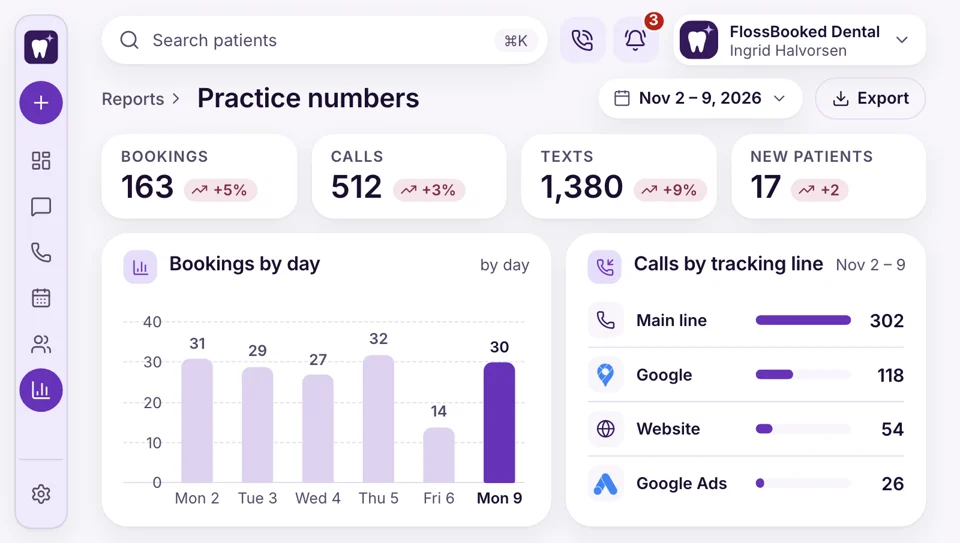
When the owner asks how the month went, open the dashboard: calls, texts, bookings, new patients and new reviews, tallied by day.
- Picked-up and rung-out calls in each open hour
- Confirmed visits and no-shows sit beside new patients for the month
Phones and routing
Calls go where you say
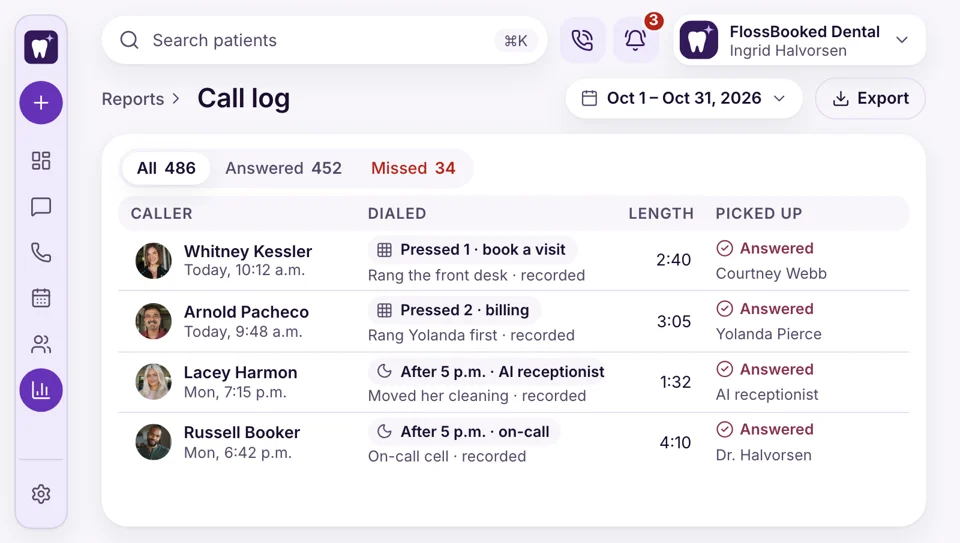
You decide who rings first. Press 1 books a visit, press 2 reaches billing, and the hygiene coordinator gets recall calls. After 5 p.m., calls route to the on-call line or the AI receptionist. Recordings of each connected call are kept for training.
- After-hours calls reach the on-call line or voicemail
- Line one rings checkout, then the back office
Google ads
Ads run by your rep
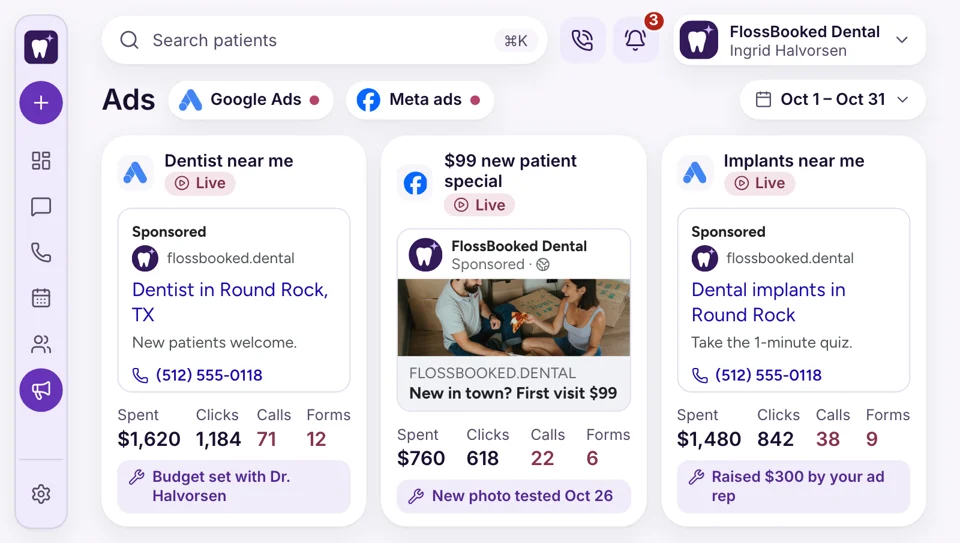
You never log into Google Ads or Meta. Your ad rep builds the search and social campaigns inside the practice's own accounts, agrees the budget with the owner and checks the numbers weekly. Ad money goes to Google and Meta, never through us, and running the campaigns is part of the plan.
- A dedicated call-tracking line on every ad credits each call to its campaign
- Your practice holds the logins to its Google and Meta accounts
Your number
The office number stays the same
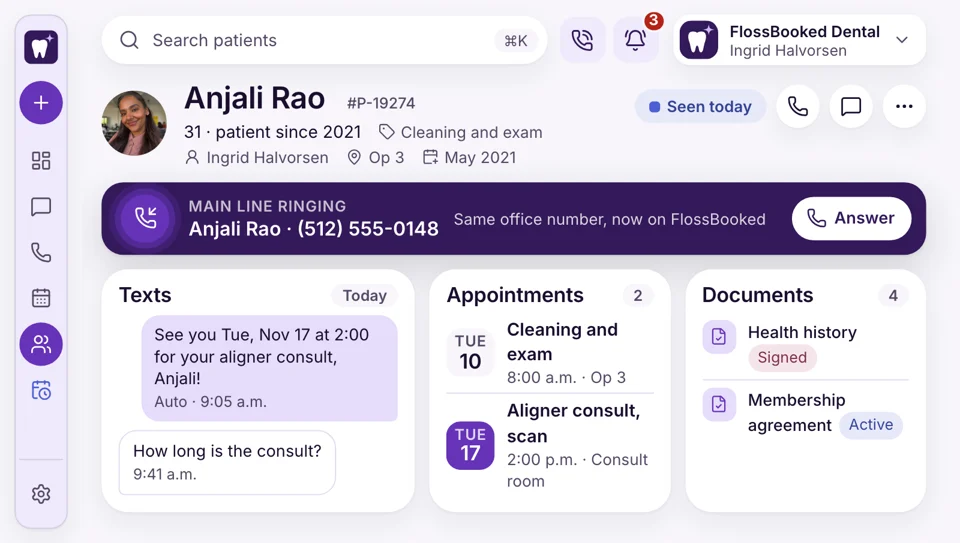
Your existing number ports to us, and patients notice no change. It rings at the computers, on staff phones through our app, and on desk phones that support SIP once we reconfigure them. An incoming call opens that patient's name and record on screen.
- Patients still dial the number they know
- A caller's name and record open on screen before you answer
Recall lists
Recall texts go out by date
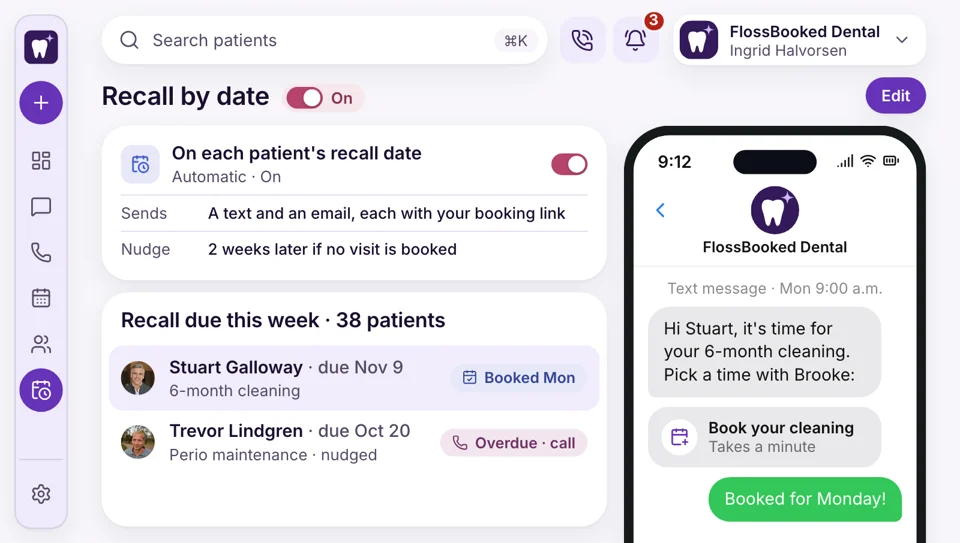
Each patient carries a recall date set from their last cleaning. When it arrives, the patient's phone and inbox both get your booking link, with a nudge later if no visit is booked. The overdue list shows who still needs a call.
- Patients reply C to confirm tomorrow's visit
- Forms and reminders go out in Spanish if asked
Google reviews
Bad reviews answered by morning
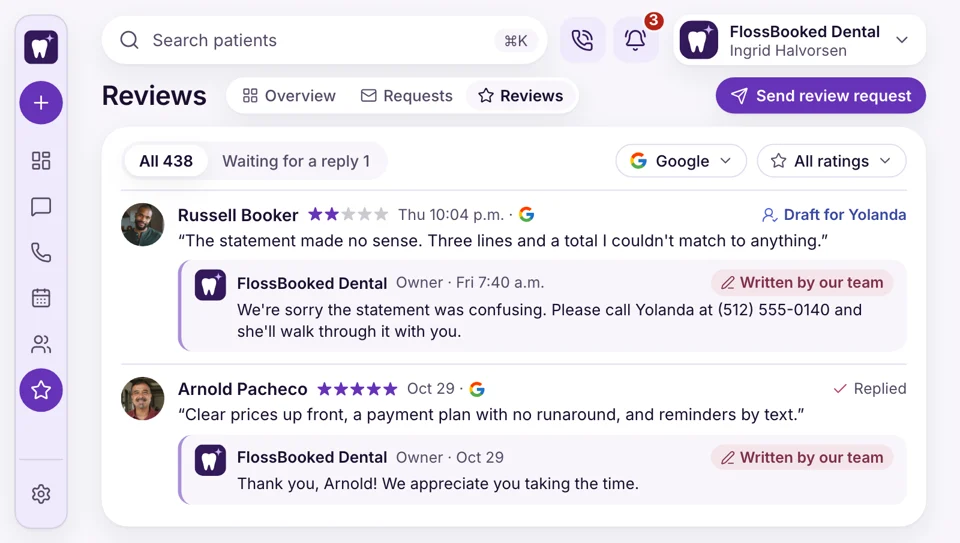
Thursday at 10 p.m., a two-star review mentions a confusing statement. Our team sees it on the reviews screen and drafts the reply under the practice name, saying nothing about anyone's treatment or whether they were seen.
- Each patient at checkout gets your review link
- Low scores on the short visit survey reach you


Every plan includes
- Internal notes
- Texts for holiday closures
- One-tap saved replies
- Every connected call recorded
- Payment links
- A staff phone app
Your month, on the report the owner reads
Once a month the report comes from our team with new patients by source, calls answered and missed, ad spend, reviews and bookings. Forward it to the owner, or go through it together on the monthly call.

New patients Counted by source: Google ads, Maps, Facebook and your website.
This monthThe report covers
- Calls Answered, missed and texted back, by line and by hour.
- Website visits Visits, calls and bookings that came through the website we built.
- Search and Maps How often nearby searches and Maps list the practice.
- Ads and spend Spend, calls and bookings for each Google, Facebook and Instagram campaign, with what your ad rep is changing next month.
- Recall Recall texts sent, and the patients who booked from them.
- Online bookings Visits patients booked themselves, by visit type.
- New reviews This month's Google stars and Facebook ratings, plus each reply we posted.
Walk us through a Monday at your desk
Tell us how calls, forms and reminders run in your office now. On the call we show that same morning in FlossBooked. Every plan carries the whole thing, starting at $97 a month.


What managers noticed

Dr. Nathan P.Owner dentist, Cedar Hill Ten minutesper reportMy office manager used to stay late building my numbers. Now the monthly report shows up, and we go over it in ten minutes.

Lucia M.Front desk lead, Brightwater 2 hoursback each dayOur manager stopped covering my phones. Rung-out calls get texted, and I answer them from the inbox.

Dr. Andre K.Associate dentist, Elmwood On timenew patient examsNew patients arrive with their medical history signed on their phones, so my exams start on time.

Tanya R.Office manager, Maple Grove 7:45voicemails already readI used to open the office to seven voicemails. Now I read them as text before eight.

Marco S.Hygienist, Northgate Before 8 a.m.openings filled againWhen a patient cancels overnight, the desk texts the ASAP list before I set up. Most mornings my column is full again by eight.

Jordan L.Operations director, four offices One dayto train a new hireEach office manager gets the same inbox and reports, so training a new hire takes a day.


Manager questions
What managers ask before switching
Try setup, training or no-shows to filter.
6 questions
Can I see the day's calls, texts and forms together?
Yes. Each patient gets one thread holding their texts, calls, voicemails, emails and Instagram, Facebook or WhatsApp messages. Signed forms and bookings sit on the same record, so the desk works from one screen.
How much of my time does setup take?
A few hours across two weeks. You join the demo call, send us your paper forms and logins, and approve the site. Our team does the import, the forms, the phones and the training.
Who handles setup and training?
Our team does. We import your patient list, connect your practice software, rebuild your paper forms online, port your office number and build the website. Before go-live, your front desk gets training on the inbox, the calendar and the phones, and your account manager stays your contact, with a strategy call each month.
Switch without losing our list or number?
Yes. Your patient list comes across from your practice software at setup, and your existing office number ports over, so patients keep calling the same line. Your old phones stay on until switch day, so the desk always has a working line.
Track confirmations and no-shows?
Yes. The appointment report lists confirmed visits, late cancels and missed appointments by week, for each dentist and hygienist. Those totals land in your monthly recap too.
Who fixes things when they break?
Your account manager. Email sales@flossbooked.com and your account manager picks it up.
Popular searches
Something we missed?
Email Lauren at sales@flossbooked.com about setup, training or moving your phone number.
Lauren PierceAccount manager
Request a demo