

Online scheduling for dental practices
Online booking that knows
a cleaning from an examBooking that knows a cleaning from an exam
FlossBooked is dental online scheduling software for US practices: patients book a cleaning, a new patient exam or an emergency visit from your site, a text or Google, inside the limits you give each visit type.
- New patient exams held with a deposit
- Reschedule links in every reminder

Live in 14 daysMonth to month, no setup fee
- Booking link in every text
- Reschedule and cancel links
- Deposits taken at booking
- Notice periods and daily limits
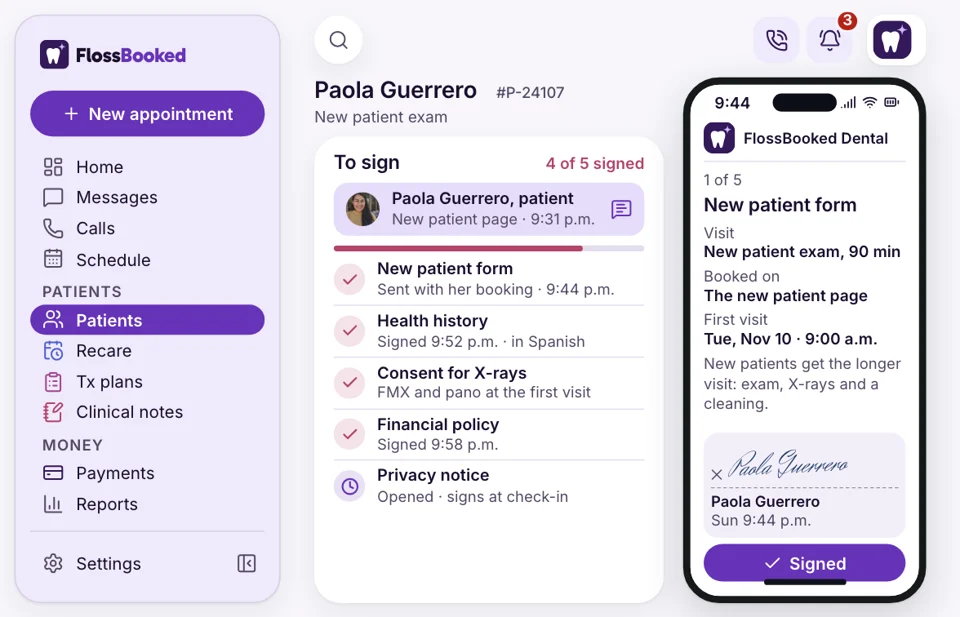
- Forms sent once they book
- Front desk approval
You tell us how long a new patient exam runs, which hygienists take perio maintenance and how much notice you need before a visit. The booking page follows those rules, with no per-booking fees.
Booked wrong, fixed by phone
Each visit type follows your rules
Booked from a phone in three taps


Where patients book
Patients reach your booking page three ways
Each path ends on your booking calendar.


At setup our team adds Book online to the practice's Google listing. A patient looking up dentists nearby taps it in Maps and picks a time on your page.
A 2 p.m. cleaning cancels at 10. Your front desk sends one text with the booking link to the ASAP list, and the first patient to tap it takes the slot. Recall texts carry the same link, so overdue patients book without calling.
Our team puts the booking button on every page of your new site, so a visitor at 11 p.m. books instead of waiting for the morning.
More than a calendar
What happens after someone books
On your dental website
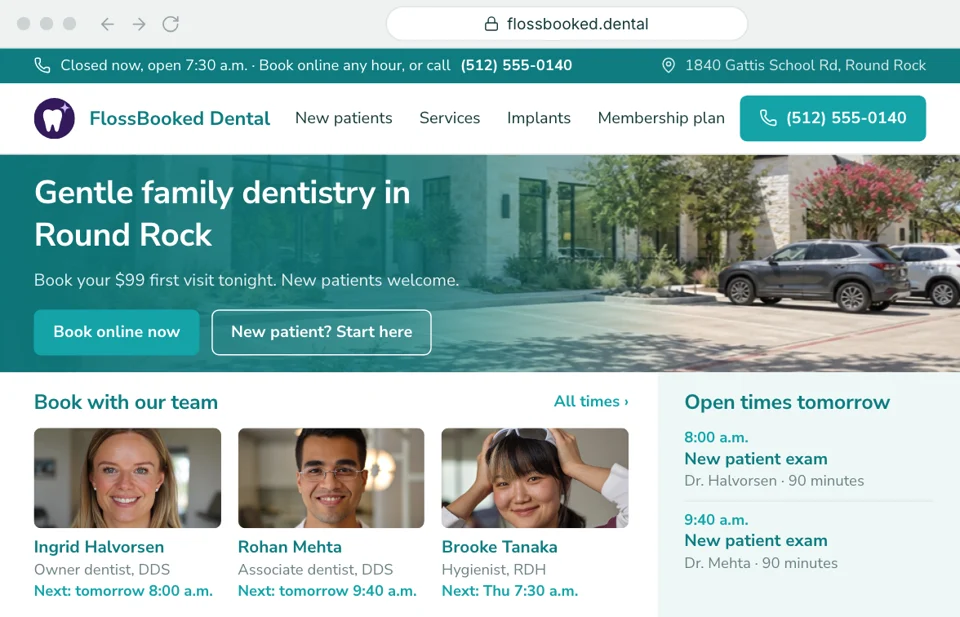
Exams booked from your website
Most new patients look at your site before they call, and plenty look after hours. On the website we write for your practice, each page carries the booking button and opens the new patient exam with the right length and the right dentist. The medical history form follows by text.
- Each service page offers its own visit type so implant consults land right
- The emergency page offers only same-day slots plus your phone number
Front desk
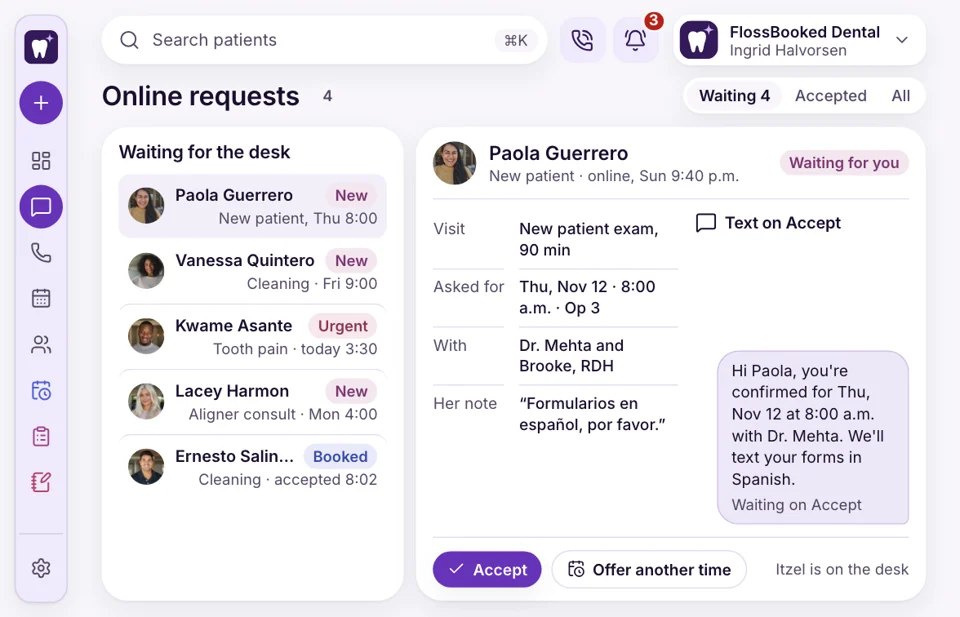
Requests your desk accepts
Some offices want a person to check every booking first. Turn on request-to-book and each online booking arrives unconfirmed in the inbox at the desk. Your front desk looks it over, taps accept, and the patient's confirmation goes out by text.
- Unconfirmed requests wait in the inbox for one tap to accept
- If a time won't work, the desk texts two other times from the inbox
Reminders and changes
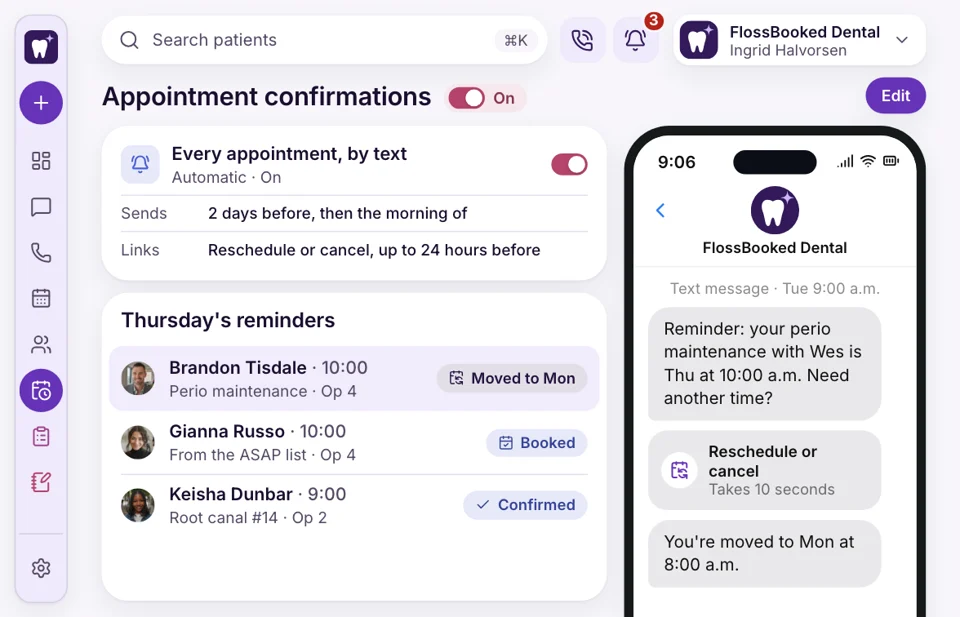
Reschedules happen inside the text
The 10:00 cancels by voicemail at 9:30, and the chair sits empty. With FlossBooked, each reminder text holds a reschedule link and a cancel link, both bound by your cut-off. A patient who can't make Thursday picks Monday from the day-before reminder, and the freed slot goes to your ASAP list.
- Patients move their own visit before your cut-off time
- Inside the cut-off, the link says call the office instead of moving it
New or returning
New patients and regulars book apart
A new patient exam needs more chair time than a returning patient's cleaning. Separate booking pages for first visits and returning patients keep each in its own lane, and you can open online booking to new patients only.
- New patients see exam slots and the forms they'll need
- Returning patients see cleanings with the hygienists you choose for online booking


Also included
- Same-day emergency slots
- Daily limits for each visit type
- Buffers between back-to-back visits
- No per-booking fees
- Each hygienist's own hours
- Confirmations sent in Spanish too
Every booking, on the patient's record
When Jasmine books a cleaning online, the record shows the visit, the deposit, the signed medical history and every text since. Your front desk opens it from the inbox, or from the caller pop-up when Jasmine phones.

Cleaning, Thursday Thursday 2:00 p.m. with Kim, deposit taken, form signed.
Booked onlineBooking ties into
- Where bookings come from See which ad, listing or page each online booking came from, month by month.
- Business phones A caller who'd rather not book online reaches your desk or gets a text.
- Google Maps listing Our team looks after your Google listing, including the Book online button patients tap in Maps.
- Dental website A site written and built by us, with the booking button on every page.
- Ads Google and Facebook ads send people to a booking page for the visit the ad is about, like an implant consult or a new patient exam.
- ASAP list One text to the list when a slot opens; first to book wins.
- Review requests Patients who came in today get a short text that opens your Google reviews.
Show us your visit types
Bring your list of visit types and who sees each one. On the call we turn them into booking rules and show you the page your patients would use, from $97 a month.


Booked while we were closed

Dr. Nathan P.Owner dentist, Cedar Hill Sundaysnew exams bookedNew patient exams started booking on Sunday nights. Each one came in with a deposit and a signed history.
Lucia M.Front desk lead, Brightwater 2 tapsto move a cleaningPatients used to call to move a cleaning while the phone kept ringing. Now they tap reschedule in the reminder, and I see the change in the calendar.

Dr. Andre K.Associate dentist, Elmwood Zerowrong-length bookingsNobody books a one-hour new patient exam into my 30-minute slot anymore. The rules hold.

Tanya R.Office manager, Maple Grove One setup callfor every ruleWe set every visit type with them on one call: lengths, notice, daily limits. It took about an hour.

Marco S.Hygienist, Northgate Before luncha cancelled cleaning was rebookedA 3 p.m. cleaning cancelled at ten. The ASAP text went out, and the slot was rebooked before lunch.

Jordan L.Operations director, four offices 4 calendarsone set of rulesAll four offices share one booking setup, each with its own hours and its own dentists.


Common questions
Asked before going live
Try a word like deposit, Google or reschedule.
6 questions
Who decides what can be booked online?
You do. You pick which visit types show online, how long each runs, who takes them and how much notice you need.
Can we approve bookings before they're confirmed?
Yes. With request-to-book on, each online booking arrives unconfirmed, and your front desk accepts it before the confirmation text goes out.
Will online bookings show up in our practice software?
Yes. Online bookings, forms and payments go both ways between FlossBooked and your practice software, and your practice software stays the schedule your desk runs on. Compatible Software lists each system we connect; our team links yours during setup.
Will the Book online button show on Google?
Yes. At setup our team adds a Book online button to your practice's Google listing, and patients tap it to book on your page.
A cleaning cancels this morning. How do we rebook it?
Your front desk sends one text to the ASAP list with the booking link. The first patient to book takes the opening.
Can we ask new patients for a deposit up front?
Yes. Take a deposit at booking, or save the card without charging it. Payments go through your own account, with no per-booking fees.
Popular searches
Still have a question?
Email Lauren at sales@flossbooked.com about booking rules, deposits or how setup works.
Lauren PierceAccount manager
Request a demo