

For practices with several offices
Calls from every office
ring a desk that's freeEvery office rings a free desk
FlossBooked gives US multi-location dental practices their front desk software, website and new-patient marketing for one monthly price: your office manager signs in once, and each office keeps its own number, hours and booking page.
- Every office's calls in one app
- One login, every office
- Each office its own web page


Live in 14 daysMonth to month, no setup fee
- One login for every office
- Office calendars
- One phone app
- Reviews per office
- Office inboxes
- AI Clinical Notes
Across offices
Lunch at one office, the call rings at another
Half past twelve, and the Riverside desk is out for lunch, its lines rolling to voicemail. Fifteen minutes away, the Main Street front desk has a free hand and no way to help. With FlossBooked, the Riverside line also rings in the phone app at Main Street. Whoever is free picks up, greets the caller as Riverside and books the visit on the Riverside calendar.

- Lunch voicemail
- Callbacks
- Separate office logins
- Shared phones
- Each office's greeting
- Lunch covered
Per office
Every office set up the way it runs
Each office keeps its own calendar, number, Google listing and review link. Your office manager signs in once and moves between offices; each front desk works in its own.
FlossBooked · Schedule · Riverside office

What the patient sees

Each office books its own dentists
Patients pick an office first, then a time with someone who works there. You set visit types once for the group, and each office keeps its own hours.
See online schedulingFlossBooked · Calls · Main Street

On the staff phone app

Any desk can take any office's call
Each office keeps its number and greeting. When Riverside's lines are full, the call rings at the Main Street desk as well.
See phonesFlossBooked · Reviews · Lakeview

The patient's review text

Reviews per office
The review text after a visit opens the Google listing of the office the patient came to, not the group's main one.
See reviewsFlossBooked · Notes · Main Street

A note ready to sign

Notes
AI Clinical Notes writes the clinical note from the appointment conversation, in the same format at every office. The dentist reads it, corrects what needs correcting and signs before the next patient.
See notesFlossBooked · Membership plans

The member sign-up page

Memberships at any office
Text a pay link from any office's number, and run one in-house membership plan for patients without insurance at every office.
FlossBooked · Reports · all offices

The monthly report

Reporting
Your account manager sends one report a month covering every office, so a slow office stands out.
ReportingFlossBooked · Recall · Main Street

A patient's recall text

One day, at three offices
How the group's phones and inboxes run on an ordinary Tuesday, office by office.
3 offices open· calls shared across all desks
7:48· Riverside
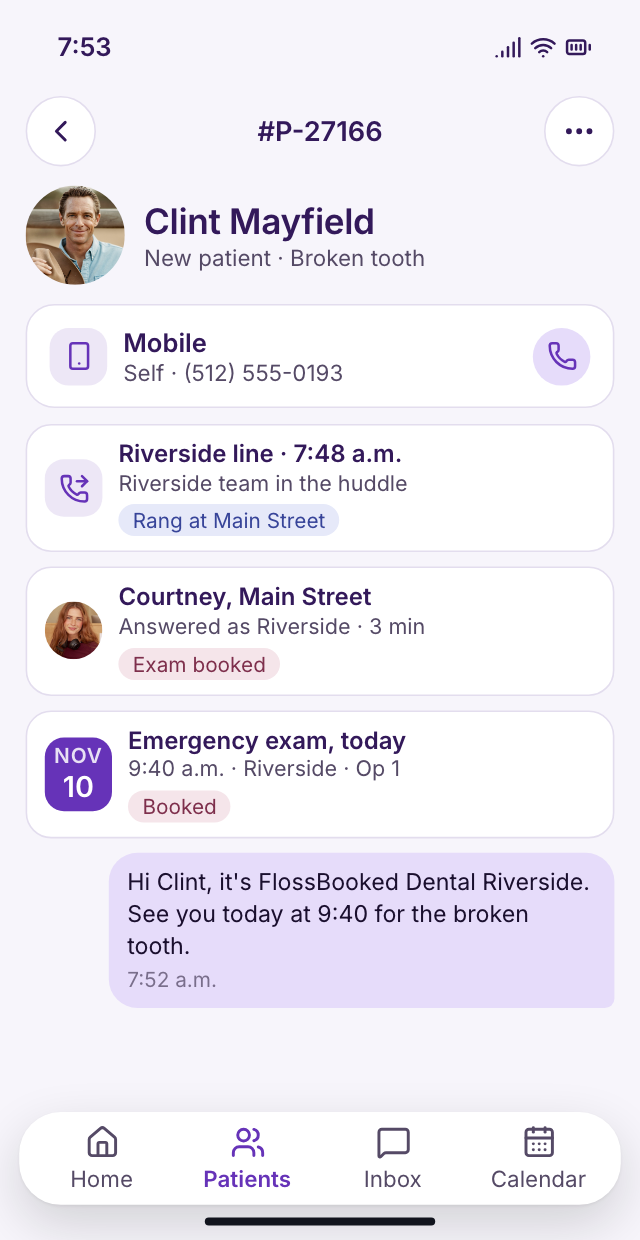
Huddle hour covered
The Riverside team is in the morning huddle. A new patient calls about a broken tooth, and Main Street answers in Riverside's name and books the exam.
12:15· Lakeview front desk
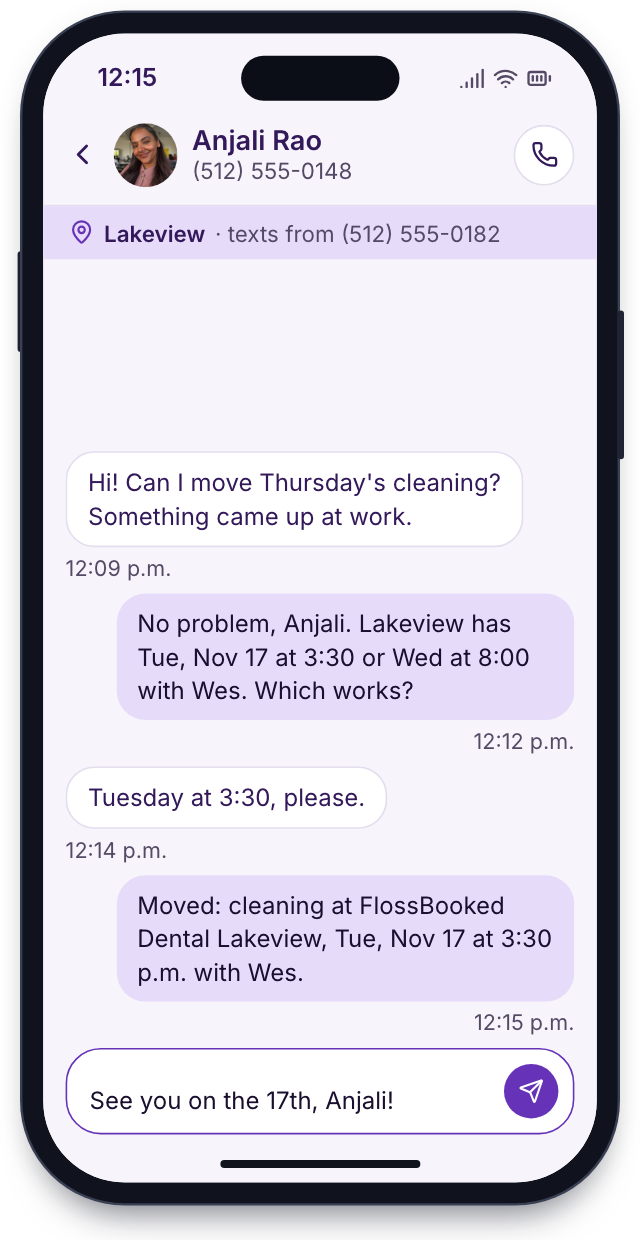
Each office's own inbox
A patient texts the Lakeview number to move a cleaning. The answer comes from Lakeview's inbox and Lakeview's number.
5:20· Main Street
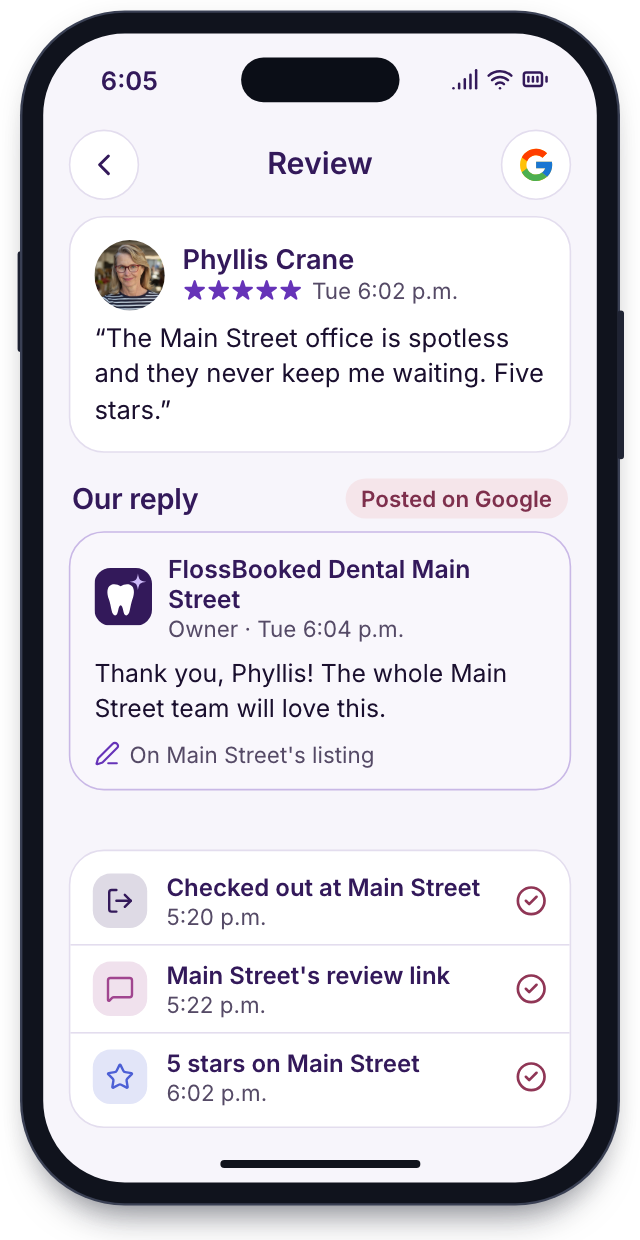
Review requests
The last patient at Main Street checks out. Their review text opens Main Street's Google listing, so every office builds its own rating on Maps.


Setup
All your offices, switched on together
Our team sets up each office in turn: its number, calendar, forms and web page. Your front desks keep working meanwhile.
Map every office
Your office manager walks us through each office's hours, dentists, hygienists, phone numbers and visit types on one call.
Days 1 to 3one call with you
Build each office
We move each office's patient list over, keep its phone number, connect its practice software and turn your paper forms into online ones.
Days 4 to 8the build
Train each office's front desk
We train each front desk on calls, texts and booking in short sessions around the schedule. Your office manager gets the group login and practices switching offices, and each hygiene team sees its recall list.
Days 9 to 12at every front desk
Every office goes live together
Phones, texts and booking pages switch on at every office together. In week three our team calls to see how each desk is doing.
Day 14phones and booking switch over
Month to month, no setup fee, live in 14 days
Group setup
Live by day 14
8 of 28 done
1Map every officeDoneIn progressUp next
- Which dentists work at which office
- Phone lines counted at each office
- Exam and cleaning lengths agreed group-wide
- Who logs in, and where
- Each office's practice software noted
- Google listings and review links gathered for every office
2Build each officeDoneIn progressUp next
- Each office's patients imported from its practice software
- Practice software connected both ways at each office
- Office numbers kept as they are
- A calendar for each office's chairs
- Booking pages built
- Paper forms put online
- Busy lines set to ring the next office over
- Recall texts in each office's name
- A web page per office with its own hours
3Train each office's front deskDoneIn progressUp next
- Training at each front desk
- Each front desk's app installed
- Group login
- The office manager tries switching between offices before day 14
- Hygiene teams shown their recall and ASAP lists
- Test calls placed at each office
- Each dentist tries AI Clinical Notes on a sample visit
4Every office goes live togetherDoneIn progressUp next
- Phones switched over
- Maps listings get the Book online button
- The first review texts go out from each office's own Google link
- First-week check-in call
- Monthly report
- Every office live
Bring your list of offices
Bring each office's hours, dentists and phone numbers. On the call we sketch how calls, booking and reviews would run across your offices, and who would log in where. Every plan carries the whole thing, starting at $97 a month.


Answered at every office

Dr. Nathan P.Owner dentist, Cedar Hill 2 officeson a single loginWe opened a second office last spring. Both run under one login, and my monthly report shows them together.
Lucia M.Front desk lead, Brightwater Zerolunch calls left on voicemailIf both our lines are busy, the third call goes over to our other office, and someone there books it for us.

Dr. Andre K.Associate dentist, Elmwood 1 formatfor notes at both officesI work at two of our offices. My notes come out in the same format at both, and I sign them before I leave.

Tanya R.Office manager, Maple Grove One loginfor three officesI switch between our three offices from one login and answer any office's texts from my own desk.

Marco S.Hygienist, Northgate Our numberon every recall text sentRecall texts carry our office's name and number, so patients reply to us here instead of the main office.

Jordan L.Operations director, four offices 14 daysfor four officesAll four offices went live inside the same two weeks, phones included.


Group questions
Questions groups ask first
Search for login, phones or setup, or type your own question.
8 questions
Can one login reach every office?
Yes. Your office manager signs in once and switches between offices, and each front desk can be kept to its own office.
Does each office keep its number?
Yes. Each office keeps its own phone number, greeting, hours and online booking page.
Can calls ring across offices?
Yes. One phone app can carry the lines of up to ten offices. Each office's line rings its own desk first, then another office's desk when the lines are full or the team is at lunch. Callers still hear their own office's greeting.
Are there reports across offices?
Yes. Your account manager sends one monthly report listing calls, bookings, new patients and reviews for each office.
How does setup work for groups?
Our team sets up each office's patients, number, calendar, forms and web page. All switch on together within two weeks.
Can we add an office later?
Yes. Our team builds the new office on the same setup your others use.
How is a group priced?
By logins across all offices, starting at $97 a month.
Offices on different practice software?
Fine. Each office connects to its own system, both ways.
Popular searches
Running several offices?
Email Lauren at sales@flossbooked.com with your offices, your practice software and how your phones run today.
Lauren PierceAccount manager
Request a demo