

Works beside your practice software
Book it once,
and your practice software has itBook it once, your practice software has it
FlossBooked gives US dental practices two-way sync with their dental practice management software: online bookings, signed forms and payments go in, and appointments and recall dates come back for reminders.
- Six systems, connected by us
- Typed in once

Live in 14 daysMonth to month, no setup fee
- Two-way sync
- Dentrix and Dentrix Ascend, both directions
- Eaglesoft and Open Dental, server-based
- Curve and Denticon, from the cloud
- Our team makes the connection
Anjali books a cleaning online after dinner and signs the medical history by text. Without a connection, someone at the front desk copies both into the practice software before the huddle. With FlossBooked, the practice software has both.
Typed in twice
Each visit entered once
What Anjali's record shows by morning


The six systems
Practice software we sync with, both ways
Find yours below; the connecting is our job.


Whether your office runs Dentrix on its own server or Dentrix Ascend in the browser, online bookings, signed forms and payments go in, while appointments, patients and recall dates come back to FlossBooked.
Eaglesoft and Open Dental live on the office's own server. Our team links each one to FlossBooked during onboarding. The desk goes on working in them exactly as before.
Curve and Denticon run in the cloud, so the link goes between the two accounts and no one installs anything in the office. A group on Denticon gets each office matched to its own location in FlossBooked.
What goes both ways
What comes in and what goes back
Your practice software stays the schedule the front desk runs on. FlossBooked reads from it and writes to it, so texts, recall and reports use current dates.
Booked at the counter
Reminders for every visit
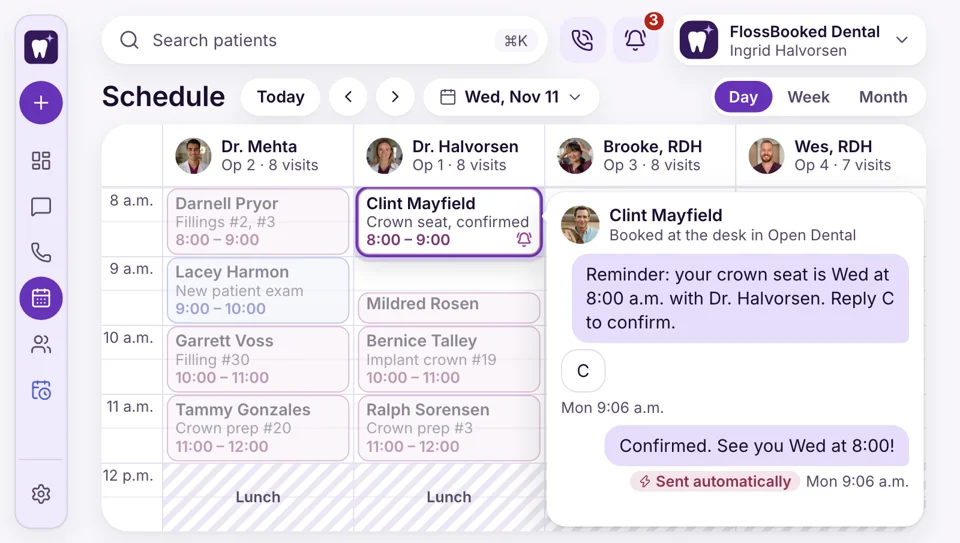
Appointments your front desk books in the practice software come into FlossBooked, so each one gets its reminder and confirmation text, not only the visits booked online.
- Reminders go out for visits booked at the desk
- Confirmed visits read confirmed at the huddle
Incoming calls
The caller's next visit, on screen
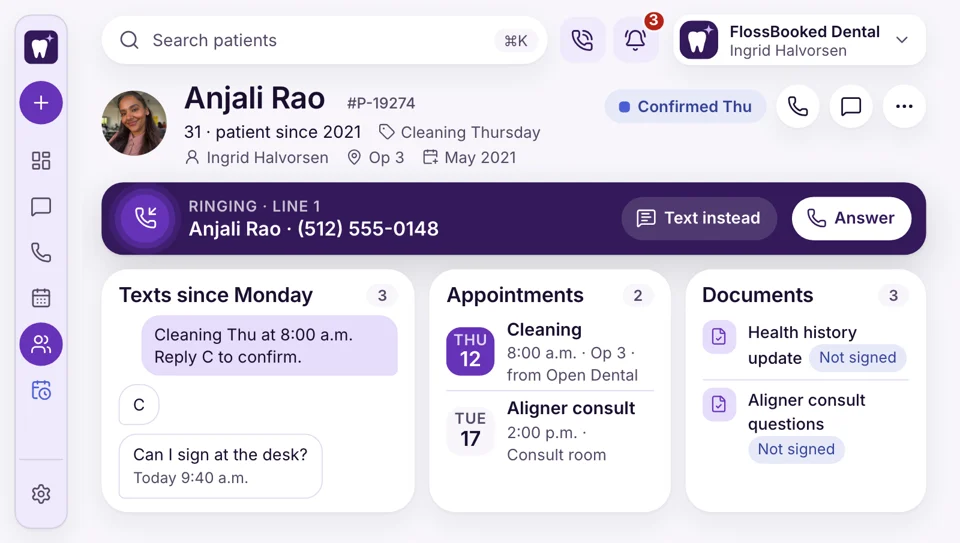
When Anjali rings to ask about Thursday, the caller pop-up at the desk shows the next visit from your practice software, the forms still unsigned and every text since. Your front desk answers without opening a second screen to look it up.
- Next visit on the caller pop-up
- Unsigned forms flagged too so the desk can text the link
Ad results
Ads traced to booked consults
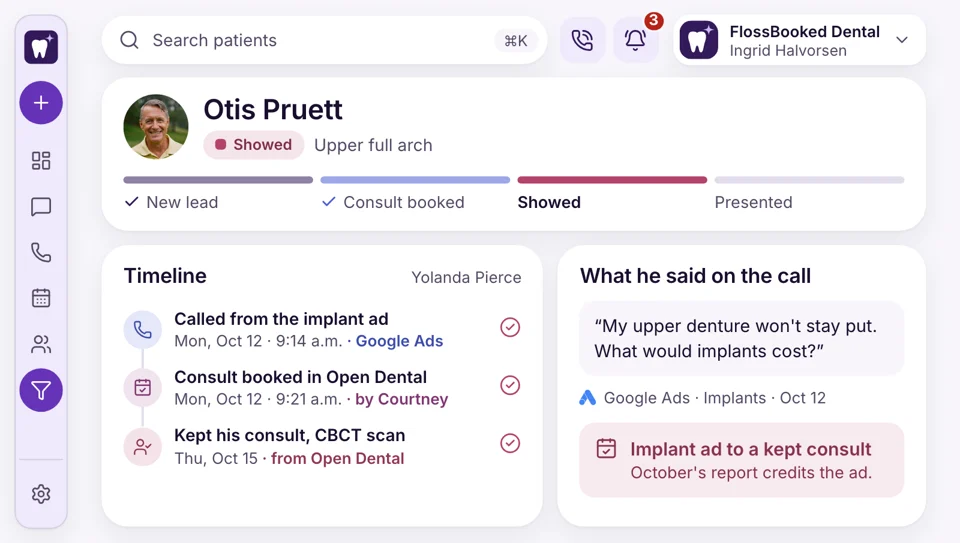
An implant ad brings a call on Monday. The patient books the consult with your front desk, and the visit goes into the practice software as usual. Because that appointment comes back to FlossBooked, the monthly report ties the consult to the ad that started it. You see which campaigns bring booked consults and which only bring clicks.
- Each booked consult is matched to its ad or listing
- Bookings counted per campaign, not clicks
Missed calls
Missed calls from patients you know
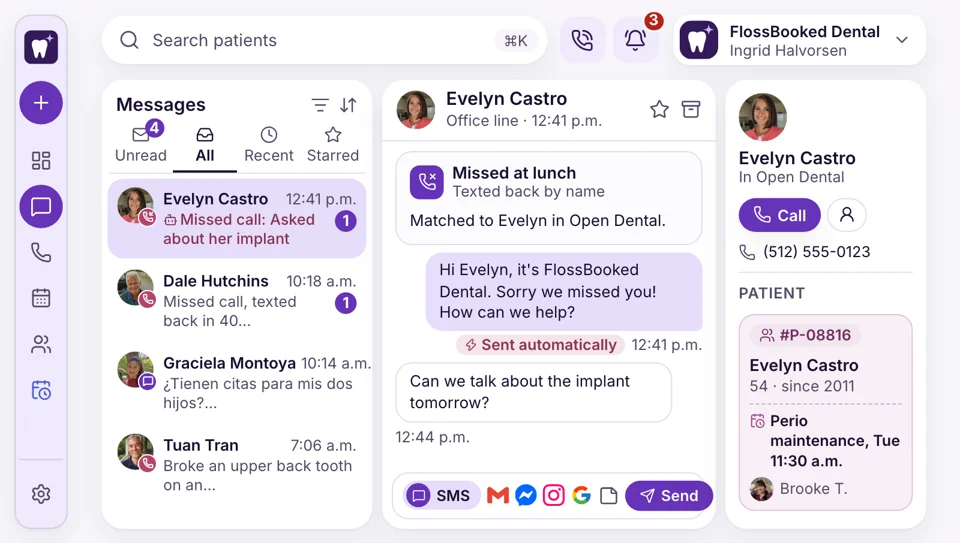
A patient of record calls during lunch and nobody is free. Seconds later the practice texts back on its usual number, and because FlossBooked knows the patient from your practice software, the text greets them by name and the reply lands on their record instead of a bare number.
- Texts greet patients by first name
- Replies land on the right record
Recall
Recall dates that stay current
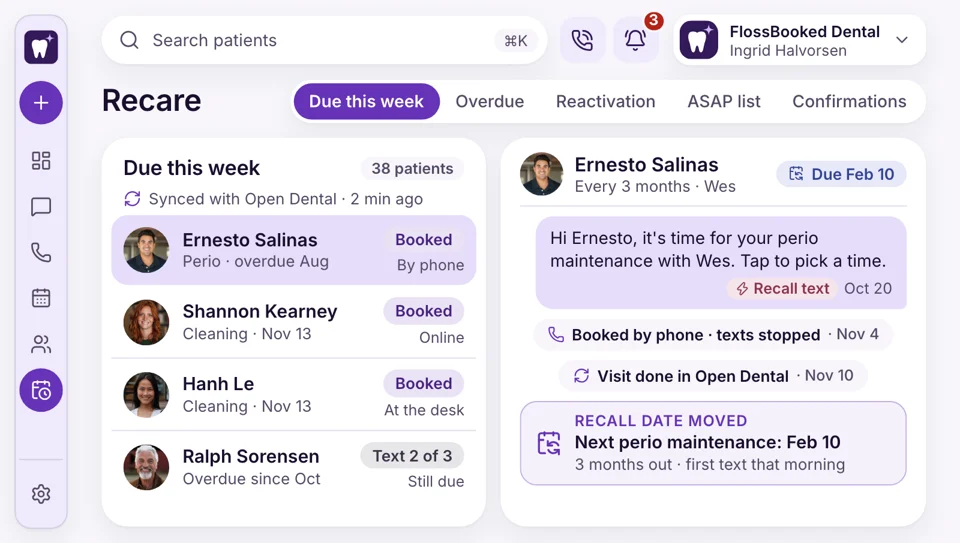
A cleaning finished in the practice software moves that patient's recall due date in FlossBooked. Recall texts reach only the patients who are due, and the overdue nudges stop once a patient books, whether online, by phone or at the counter.
- Booking at the counter stops the overdue texts
- Due dates move after every cleaning, wherever it was booked
Reviews
Reviews
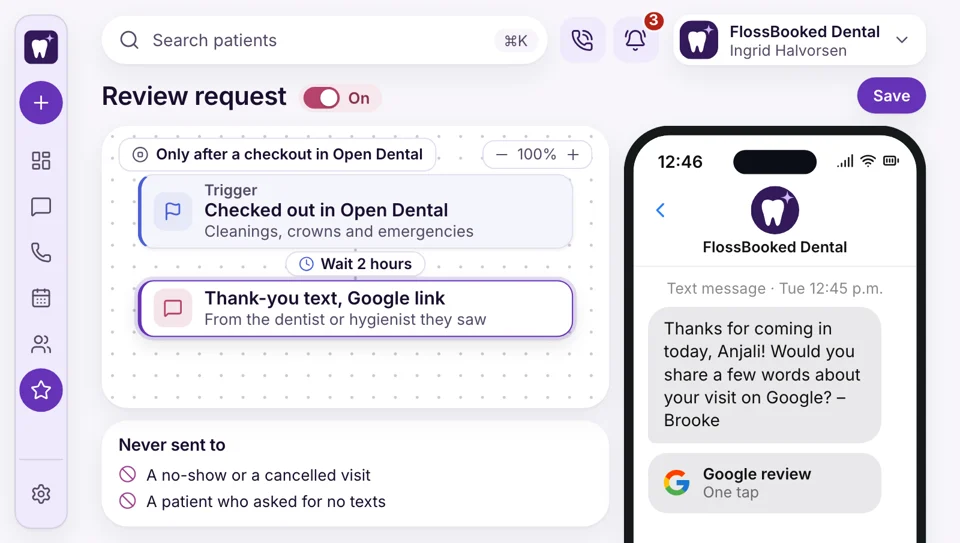
Once your desk checks Anjali out in the practice software, FlossBooked sees the checkout and sends a review request a little later. Nobody at the desk has to tap anything, and patients in for a cleaning, a crown or an emergency all get the same short text that opens your Google reviews.
- Review texts go out with no tap from the desk
- Sent a little after checkout


Also synced
- New patients from the counter
- Cancellations from your software
- Visit types
- Dentist and hygienist hours
- Signed consent forms, saved back
- Recall dates after each cleaning
Anjali's record, the same in both
Anjali books a cleaning online and signs the medical history by text. The visit and the form appear in your practice software and on the FlossBooked record, along with every text since.

Next visit Cleaning, Thursday 2:00 p.m. with Kim. Confirmed by text, history signed.
From DentrixTies into
- Phones The caller pop-up shows the next visit from your practice software.
- Dental website Bookings made on the website our team built reach your practice software too.
- Google Maps listing Book online taps from Maps reach your practice software like any other booking.
- Ads we run Each consult from an ad is traced back to its campaign, month by month.
- ASAP list One ASAP text; the booking lands in both.
- Online booking Patients book online; the visit appears in both.
- Review requests Each checkout in your practice software sends the patient a short text for your Google reviews.
Tell us which practice software you run
On the call, name your practice software and its version. We show what goes in, what comes back and the setup our team does for you. Every plan carries the whole thing, starting at $97 a month.


Typed in only once

Dr. Nathan P.Owner dentist, Cedar Hill Keptour practice softwareWe kept Dentrix, which mattered to me. Online bookings and signed forms now land in it without anyone retyping them.
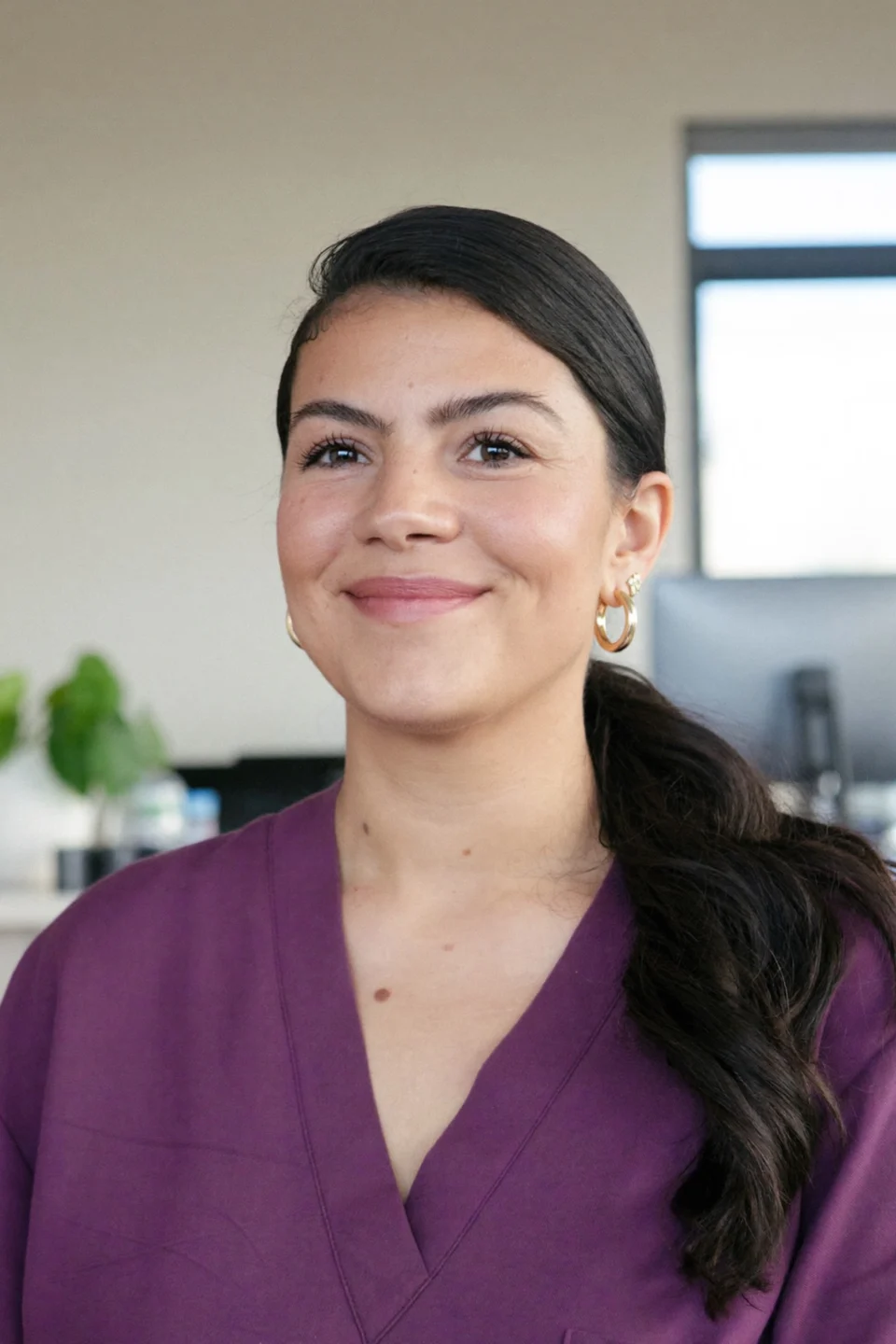
Lucia M.Front desk lead, Brightwater 15 minutesback before each huddleI used to copy every online booking into Eaglesoft before the huddle. These days they're waiting on the schedule when I sit down.

Dr. Andre K.Associate dentist, Elmwood Signed formson file before seatingWhen I open a patient in Open Dental, the medical history they signed on their phone is already on the record.

Tanya R.Office manager, Maple Grove Oneschedule to checkOur Curve schedule and the reminder texts finally agree. Confirmations show where we look.

Marco S.Hygienist, Northgate No repeatsto rebooked patientsRecall texts stopped going to patients I'd already rebooked chairside. The due date moves as soon as I finish the cleaning.

Jordan L.Operations director, four offices 4 officeslinked at setupOur four offices on Denticon were linked during setup, and nobody at the desks changed how they work.


Sync questions
Before you connect your practice software
Type the name of your practice software, or a word like forms.
6 questions
Will it connect to our practice software?
Yes, if your office runs Open Dental, Denticon, Dentrix, Curve, Eaglesoft or Dentrix Ascend. FlossBooked syncs with each of them both ways, and our team connects yours during setup, included in the monthly price.
Is it a real two-way integration, or just a connector?
It's two-way. Bookings, confirmations, signed forms and payments go into your practice software, and patients, appointments and recall dates come back. Our team does the connecting and watches it closely through your first weeks live.
Will our data live twice?
Your practice software stays the record the desk works from. FlossBooked keeps what it needs to text, call, book and take payments: names, numbers, appointments and recall dates, plus the forms and messages that start on our side. Those forms and messages are copied back onto the patient's file in your practice software, so the full history stays where it has always been. FlossBooked keeps HIPAA-compliant forms, portal and messages, with a signed BAA.
Do we need new practice software?
No. Your practice software stays, and your front desk keeps working in it the way it does today. FlossBooked works beside it for texts, phones, online booking, forms and payments, and at setup our team moves your patient list over.
What if ours isn't listed?
Send its name to sales@flossbooked.com. We'll tell you plainly what connects today. FlossBooked's texts, phones, booking and forms still run beside it, and our team still moves your patients over at setup.
Does the desk's day change?
Very little in the practice software: the same schedule as always, with online bookings and confirmations already on it. Texts, calls and pay links happen in FlossBooked's inbox, at the desk or in the staff phone app.
Popular searches
Using something else?
Lauren answers at sales@flossbooked.com; include your practice software and its version.
Lauren PierceAccount manager
Request a demo