

Medical history and check-in for dental practices
New patients arrive
with their history signedNew patients arrive with their history signed
FlossBooked's digital dental forms are for US dental practices: patients complete their health history, medication list, allergies and office policies on their phone the night before, sign, and the answers file into your practice software.
- Texted out once a visit is booked
- Your paper forms, rebuilt online

Live in 14 daysMonth to month, no setup fee
- Form link by text
- Yearly health history updates
- Card saved at check-in
- Filled before they arrive
- Tablet check-in at the desk
- A signed BAA
Paola books a new patient exam for Tuesday at 8:00. FlossBooked texts the forms that minute, and Paola lists every medication and allergy from the couch. At 7:50, your front desk only has to say hello.
Clipboard at the counter
Signed before they arrive
One text, one link, signed in minutes


Where they sign
One set of forms, three places to sign
Every signed copy ends up on the same record.


Whether the visit was booked online or by phone at the desk, the forms for that visit type go out by text. A new patient exam gets the full set; a cleaning gets the health history update.
Returning patients open your practice's app or the web portal to sign this year's history, see and pay an invoice, or manage their membership plan. On iPhone and Android, the app shows your logo and name, not ours.
Hand a walk-in your office tablet with the forms open. Their signature saves to the record before they sit down.
Beyond the form
Where the answers go once a form is signed
On your website
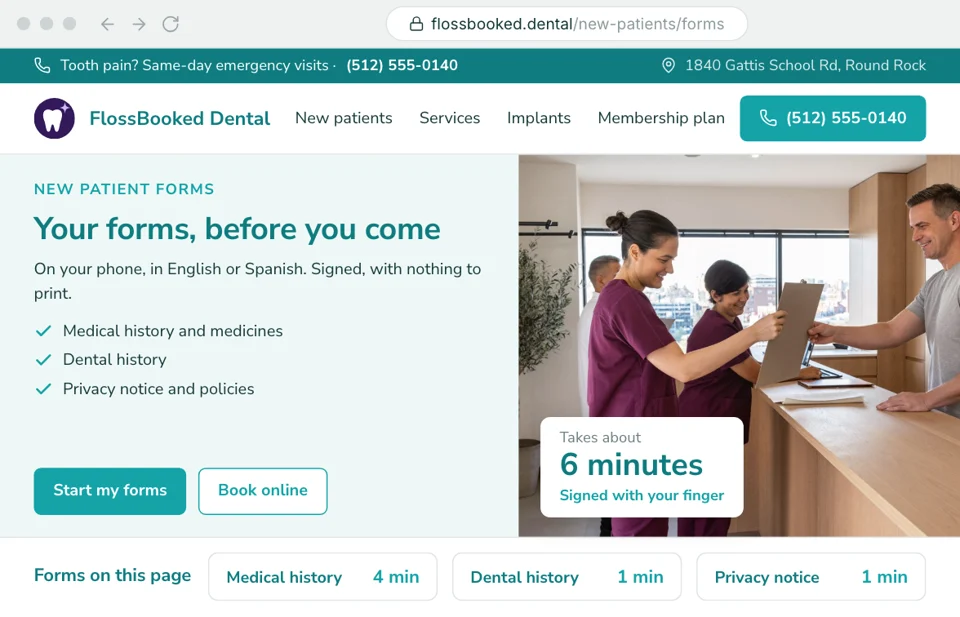
A forms page instead of a PDF
Most practices still post a printable PDF, and new patients bring it in half done. On the site we design and host for your practice, the New Patient Forms page opens the same forms patients get by text, so the answers arrive signed and the desk never retypes them. A Book online button sits next to it.
- Linked from the menu and from every new patient offer on the site
- Built by our team from your forms
Inbox
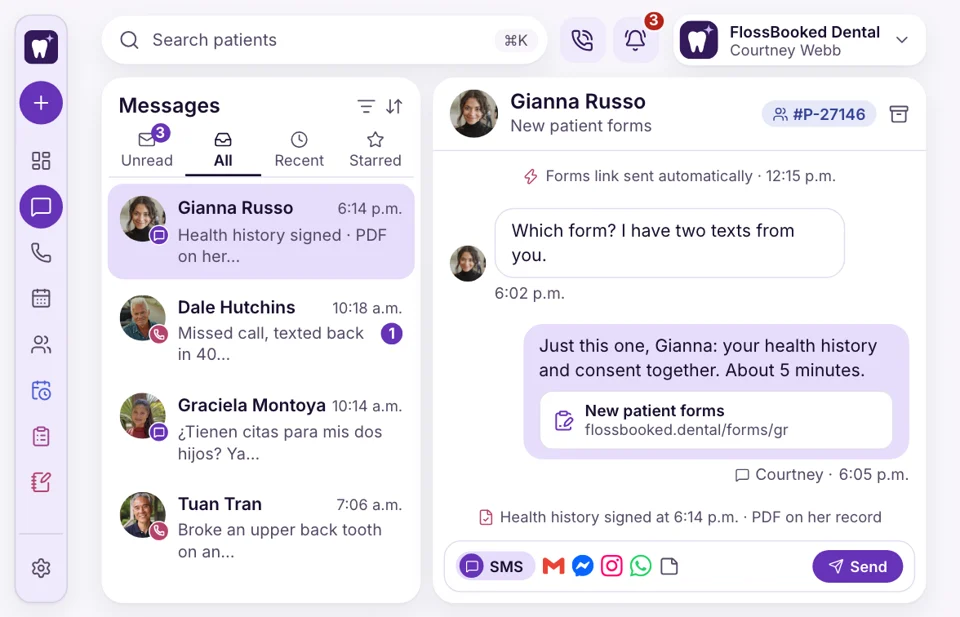
Replies reach the desk
A patient texts back “which form?” and the reply lands in the inbox at the desk, in the same conversation as the link. Your front desk answers there, or resends the link with one tap. Each patient's record shows the signed PDF and when it was signed, so nobody wonders whether the history came in.
- Signed copies saved as a PDF with date and time
- Resend a missing form from the conversation with a single tap
Returning patients
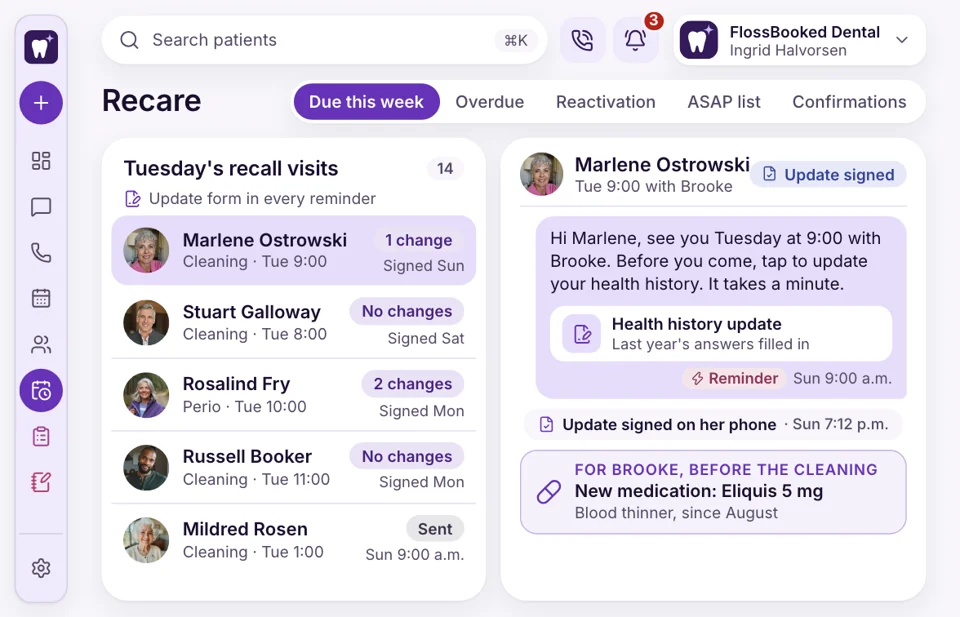
Updates before every recall visit
Long-time patients sigh at a blank health history every year. With FlossBooked, the recall reminder carries a short update form: any new medications, new conditions, any surgery since the last cleaning. Patients tap through it in a minute, and the hygienist sees the changes before the cleaning starts.
- The update asks only what is new
- No update yet? A second text lands the day before
At setup
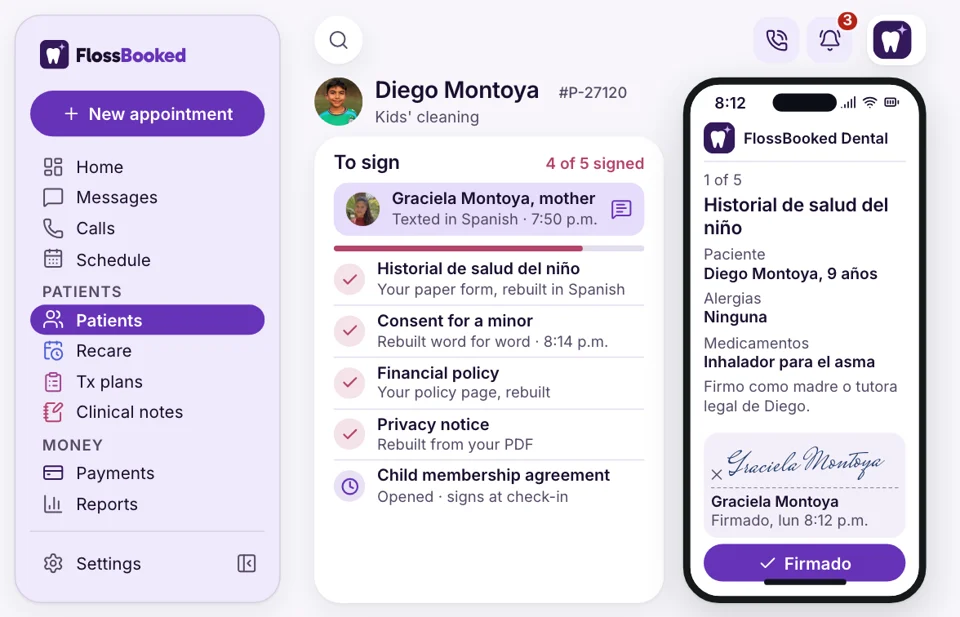
We rebuild your paper forms
Hand us the stack you use now: the medical history, the financial policy, the privacy notice, the new patient sheet. Our team rebuilds each one as an online form with your wording, adds a Spanish version, and trains the front desk before you go live.
- Your wording kept word for word on each form
- Changes later are made by our team too


Also included
- Forms in Spanish too
- Signed PDF copies
- Finger signatures
- Your own policy pages
- Emergency contact on file
- HIPAA-compliant forms, portal and messages, with a signed BAA
Signed forms, beside every text and visit
Open Paola's record and the signed history is there with the date, the consent forms, Tuesday's exam and every text since the booking. A call from Paola opens it too.

Medical history form Signed 9:12 p.m. Monday, two medications and one allergy listed.
Signed MondayForms tie into
- Reports The monthly report counts new patients by source, from the ad to the signed forms.
- Phones A caller's record opens with forms attached.
- Google Maps listing Our team adds your forms link to the practice's Google listing, beside the booking button.
- Website A New Patient Forms page on the site we write and build for your practice.
- Ads A patient who books from an implant ad gets the consult forms by text, so they arrive with history signed and questions written down.
- Reminders The day-before reminder carries the form link for anyone who hasn't signed.
- Reviews Each visit can end with a Google review request.
Send us your paper forms
Bring the forms you use today. On the call we show one rebuilt online and signed on a phone. Every plan carries the whole thing, starting at $97 a month.


Mornings without retyping

Dr. Nathan P.Owner dentist, Cedar Hill Read aheadon my phoneI read each new patient's medical history on my phone before I walk in. The allergies are right there, in the patient's own words.
Lucia M.Front desk lead, Brightwater Zeroretyping before the 8:00I used to retype every medication list at 7:50 while the 8:00 waited. Now patients walk in with everything signed.

Dr. Andre K.Associate dentist, Elmwood Signedthe night beforeA patient who refused the clipboard filled in the whole history on the phone the night before. No argument at the desk.

Tanya R.Office manager, Maple Grove 11 formsrebuilt for usThey rebuilt all eleven of our paper forms, with Spanish versions, inside the two weeks of setup.

Marco S.Hygienist, Northgate 1 day earlyon med changesThe recall reminder asks about new medications, so I know about a change before the patient is even in my chair.

Jordan L.Operations director, four offices 1 form setfor four officesEach of our four offices sends the same forms now, and every signed copy lands on the patient's record.


Common questions
Before the first form
Try a word like Spanish, tablet or paper forms.
6 questions
Do patients need a computer to fill these in?
No. Patients get a text with one link, then complete and sign every form on a phone any time before the visit.
Do we have to change our forms?
No. Send us your current paper set, and our team rebuilds each form online in your own wording before you go live.
Will our practice software get the signed answers?
Yes. Signed forms are filed to the patient in your practice software through the two-way connection our team sets up at onboarding, and your practice software stays the record your dentists work from. Compatible Software shows the systems we connect.
Will new patients get their forms without us sending them?
Yes. Each visit type has its own forms, texted to the patient once that visit is on the schedule.
Can patients fill in the forms in Spanish?
Yes. Our team writes a Spanish version of every form, and patients who prefer Spanish get that version by text.
What about patients who won't fill in their history again?
Returning patients get a short update rather than the full form: a few yes-or-no questions on what's changed since their last visit.
Popular searches
A question we missed?
Email Lauren at sales@flossbooked.com with a copy of your blank forms, and Lauren will say how each one moves online.
Lauren PierceAccount manager
Request a demo