

Reporting for dental practices
Twenty new patients this month.
Which ad sent them?Twenty new patients. Which ad sent them?
FlossBooked is dental analytics software for US practices: it ties each new patient to the ad, Google listing or web page that sent them, and counts every call and booking by where it started.
- New patients by ad
- Monthly summary included

Live in 14 daysMonth to month, no setup fee
- Calls by source
- New patients by campaign
- Spend beside each booking
- Website visits and bookings
- Our team's written recap of your marketing
One company hosts the site and does the SEO, another runs the ads, and Google bills for the clicks. About twenty new patients arrive a month, and the intake form says none for how they heard. FlossBooked counts every call, booking and new patient by where it started, so the guessing stops there.
Three bills, no answer
Every new patient, traced
Short enough to read over coffee


The dashboards
Your month, in three screens
Each one answers a question owners ask.


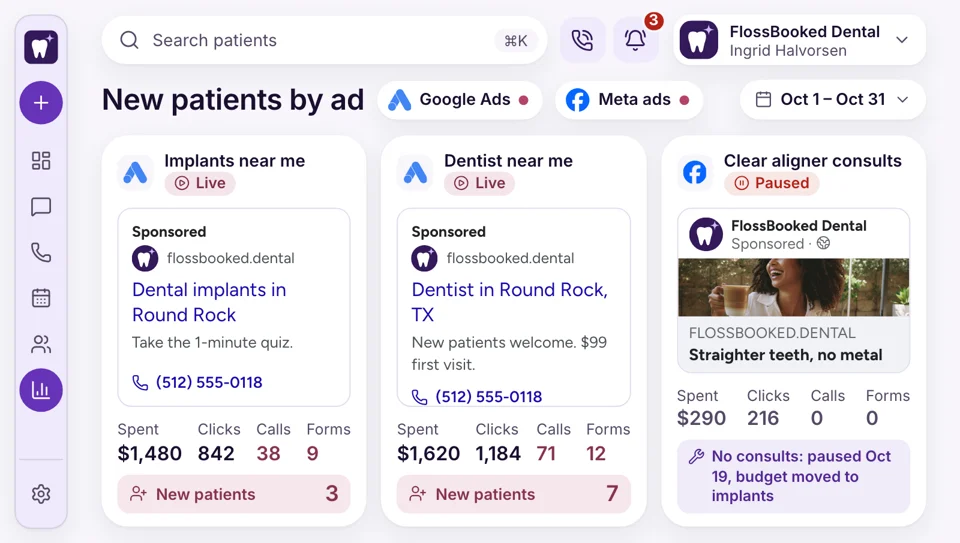
Each Google campaign, each Facebook campaign and your Google listing get a line with this month's spend, calls, bookings and new patients. If the implant campaign booked two consults and the cleaning campaign booked nine exams, that's the first thing you read.
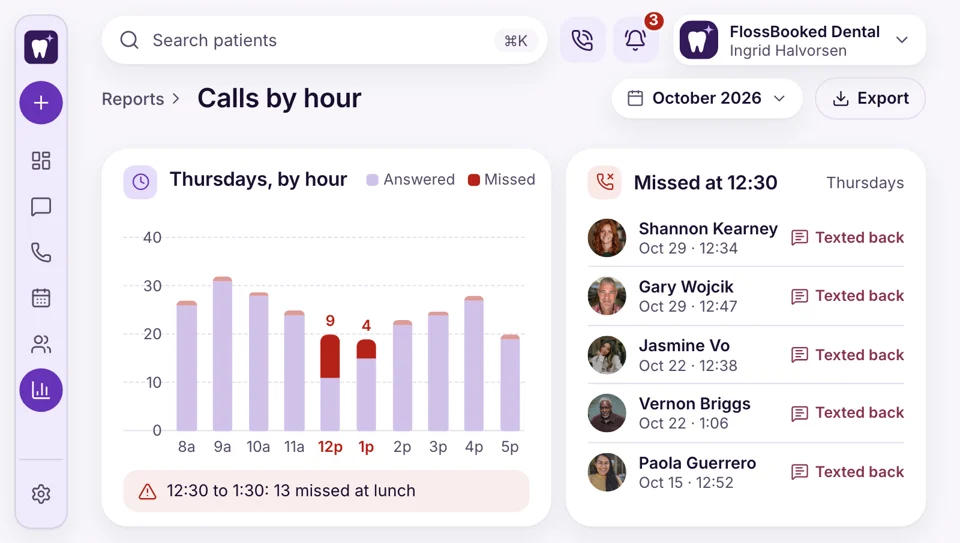
Answered, missed and voicemail calls for each hour of the week. If Tuesday's lunch hour sends eight callers to voicemail, you know where a second person or the AI receptionist would help.
The site our team built for you keeps its own count: visits, phone calls and online bookings for each page. You can see that the implant page brought four consult bookings and the emergency page brought eleven calls.
Report by report
What each report tells you
Each report answers one question an owner or office manager asks on a Monday: which ads booked, who called, who confirmed and what patients wrote online.
Practice dashboard
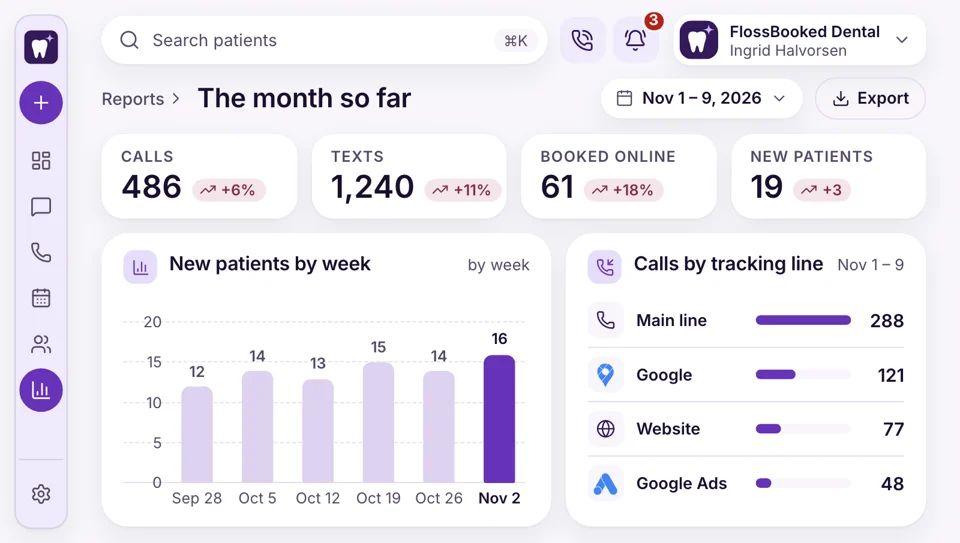
The month so far
Open the dashboard and see this month's calls, texts, online bookings, new patients, reviews and payments taken through FlossBooked, each set against last month. The office manager checks it on Monday before the first patient.
- Each count opens the patients behind it
- Compare any month against the one before it side by side
Call tracking
Which listing made the phone ring
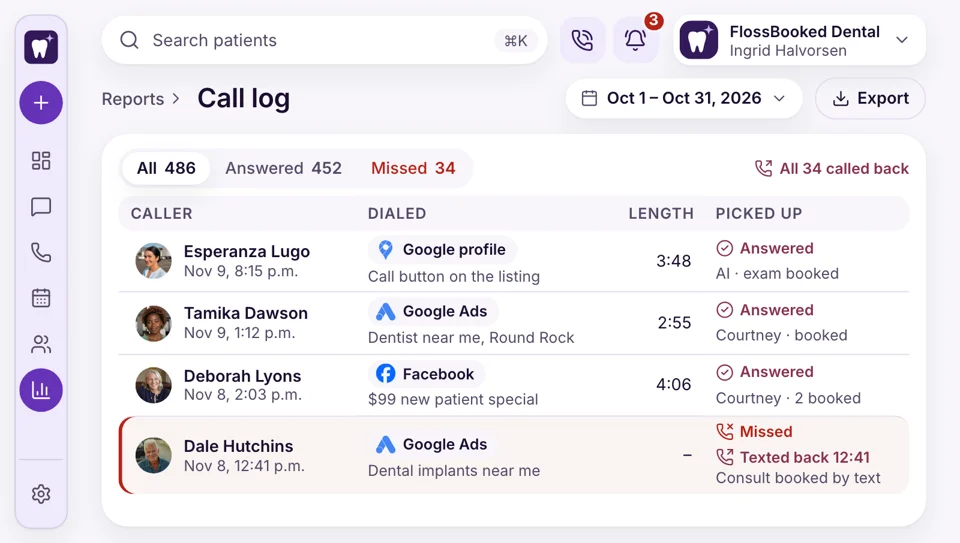
A patient finds you on Google Maps and calls. Another sees a Facebook ad and dials the number in it. Each source gets a separate tracking number, all of them ringing at your front desk, so the call report shows where each call started and whether it ended in a booking.
- Tracked calls ring the front desk like always
- Recorded calls play back from the call report itself
Ad results
Ad money traced to booked exams
Ads cost the same whether they work or not, so each dollar should show what it booked. The marketing dashboard puts each campaign's spend beside its calls, bookings and new patients. When the implant campaign books and another stalls, the slow one gets cut and its budget moves. Ad money goes to Google and Meta, never through us, and running the campaigns is part of the plan.
- Each campaign line puts spend beside its exams
- Our team moves budget to campaigns that book
Missed calls
The hours your phones go unanswered
Your front desk thinks lunch is quiet. The call report says otherwise: answered, missed and voicemail calls counted by day and hour, with each missed caller listed. The office manager spots Thursday's 12:30 gap, moves one lunch break or turns on the AI receptionist for that hour, and next month's report shows whether it worked.
- Each missed caller listed with number and time
- Voicemails show beside the call they came from
Reminders
Confirmations and no-shows counted
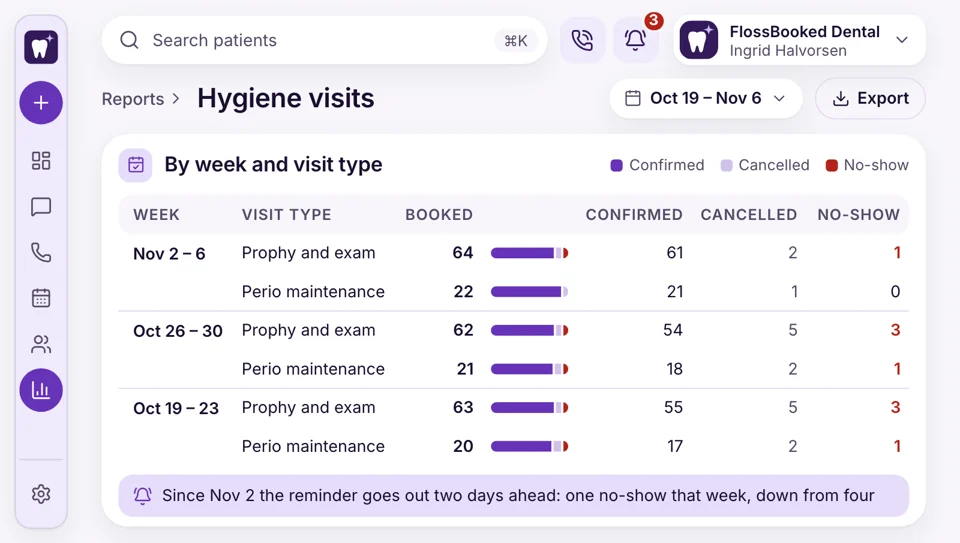
Your hygiene column loses three visits a week to no-shows, and nobody knows whether the reminders help. The appointment report shows, week by week and by visit type, how many visits were confirmed, cancelled or missed, which tells you whether moving the reminder earlier helped.
- Weekly confirm rates for each reminder text
- No-shows listed by name for a follow-up text
Reputation
Reviews
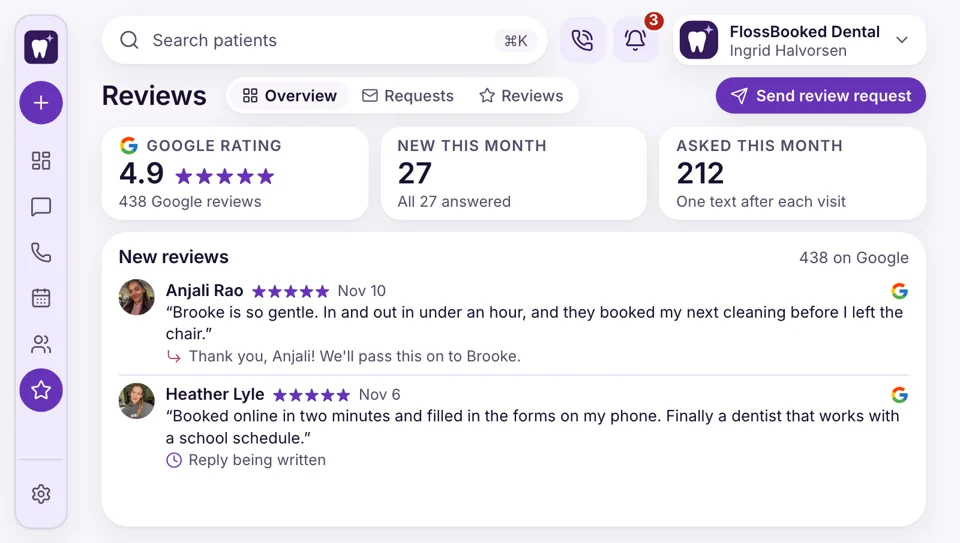
The review report shows how many Google reviews came in each month, the average rating, and which ones our team answered in your practice's name. Once a request goes out after each visit, you watch the monthly count and see the dates new reviews arrived.
- Each review sits beside the reply we wrote
- Review requests are counted against the reviews they bring in


Also included
- Reports as CSV downloads
- Bookings by visit type
- Text reports
- Chats counted by day and hour
- Review counts monthly
- Payment totals for each source
Tamika's first visit, traced to an ad
When Tamika books a new patient exam from a Google ad, the record keeps the campaign name, the recorded call and the booking date. Reports count records like it by ad, listing and page.

Source Google Ads, implant campaign; called Tuesday 6:40 p.m.; exam booked Friday.
First visitReports draw from
- Phones Tracking numbers per ad and listing ring your desk.
- Website Visits, calls and bookings counted for each page we build.
- Google Business Profile Calls and bookings from your listing, counted monthly.
- Paid ad campaigns Spend, calls and bookings for each campaign we run, read from the ad accounts in your practice's name.
- Texts Replies and confirmations counted for every text you send.
- Online booking Each booking keeps the page or link it came from.
- Review requests Requests sent after visits, set against the reviews that came back.
Bring last month's marketing bills to the call
Bring what you paid for your site, your ads and your clicks last month. On the call we show you the reports you'd get for the same spend, from $97 a month.


Knowing which ads book

Dr. Nathan P.Owner dentist, Cedar Hill Threebills explainedI paid three marketing bills and couldn't tell you which one worked. Now I see the new patients next to each one.

Lucia M.Front desk lead, Brightwater Noneawkward questionsAsking new patients how they heard about us always felt awkward. The call report answers it for me now.

Dr. Andre K.Associate dentist, Elmwood Consultsmatched to their adThe implant ads looked expensive until the report showed the consults they booked. Now I know which ones to keep running.

Tanya R.Office manager, Maple Grove 12:30calls now answeredThe call report showed our 12:30 calls going to voicemail. We staggered lunches, and nobody gets voicemail at 12:30 anymore.

Marco S.Hygienist, Northgate No-showsdown in my columnI check the no-show count for my column every week, and the reminder timing we changed actually helped.

Jordan L.Operations director, four offices Four officesone summaryThe monthly summary puts all four offices side by side, so I know where to spend next.


Common questions
Before you rely on the numbers
Try a word like sources, no-shows, export or ads.
6 questions
Do small practices need this?
Yes, and small practices feel it most: with one dentist and twenty new patients a month, every wasted ad dollar shows. You don't have to open a dashboard at all; our team sends the monthly summary.
Our practice software already has reports. Why add this?
Your practice software reports production and the schedule, and it stays. FlossBooked reports what happens before the visit: which ad, listing or page brought each call and booking, and which calls went unanswered.
Which ads bring new patients?
At setup we give every ad, Google listing and site page a separate tracking number plus a tagged booking address. When a new patient calls or books, the record keeps the source, and the report adds them up by campaign, listing and page each month. Patients who walk in or come by referral can be tagged by your front desk in one tap, so the count covers them too.
How do we track no-shows?
Open the appointment report. Week by week and by visit type, it shows how many visits were confirmed, cancelled or missed, and lists every no-show by name for a follow-up text from the desk.
Is our marketing working?
The marketing dashboard answers that each month: spend for each campaign beside its calls, bookings and new patients. Your account manager reviews it on a call and names the change we'd make next.
Can we export data?
Yes. Reports and patient lists download as CSV files, ready for Excel, Google Sheets or the accountant who does your books.
Popular searches
Still have a question?
Email Lauren at sales@flossbooked.com about the dashboards, call tracking or the monthly summary.
Lauren PierceAccount manager
Request a demo